Policy-as-Code for Database Migrations
The Problem
Development teams today rarely stick to the basics for long. With all the knowledge and experience out there, and the excitement to try new combinations of tools, products quickly become a playground of platforms and services.
Fast-paced development has its pros and cons, and one of the biggest challenges development leaders face is compliance, whether it be to security or industry standards. Managing the databases that support your application can be a fragile task, and adding more complexity to the system only further tips the glass.
Database governance encourages defining a framework for how to manage your database schemas to ensure compliance and security. This can take months to implement, and even then, it is not a guarantee that your team will follow the policy consistently.
As projects become more complex and new engineers are added to the team, enforcing this framework becomes more difficult. Policy-as-code closes this gap by codifying policies that are enforced in CI/CD pipelines.
The Limits of Manual Governance
In a typical schema change, a reviewer reads the migration, checks it against an informal checklist, and hopefully catches
the risky ALTER or the stray DROP. Engineers are asked to memorize standards or know where to find the proper documentation
page (if it exists).
That can work for a while, but it does not scale cleanly for two reasons:
-
The rule set tends to grow faster than programmers can keep up with. Alternatively, the rule set becomes too large for a new hire to understand and follow from the start.
-
Manually checking every rule against every schema change gets tedious. Over time, the checklist meant to reduce risk starts to feel like friction. Friction invites shortcuts. Shortcuts invite incidents.
If correctness depends on humans repeating the same careful steps under time pressure, you can expect variance. Policy-as-code is how you transform that variance into consistency.
Automating Database Governance
Atlas comes with a set of built-in analyzers and checks that can be automatically run against your schema definition, migration files, and migration plans both locally and in CI. They check for schema changes that are most commonly linked to production issues, such as non-linear changes, backward incompatible changes, destructive changes, and more.
Non-linear Changes
Picture two developers both adding a migration on the same day from slightly stale copies of main. Their files land with overlapping version numbers or as new files slipped in front of migrations that some environments have already applied. The schema states expected by either migration does not exist and they cannot be fully applied. Rollbacks become guesswork because the folder on disk no longer matches a single chronological path that can be replayed.
With Atlas, your migration directory is treated like a repository whose commits should append in order. When that linear story breaks, Atlas can surface the mismatch in CI so you catch branch-merge accidents before they become surprises in deployment.
lint {
  non_linear {
    error = true
  }
}
Teams that want lint to fail on these findings can tighten the hook. It can also be relaxed for teams that occasionally update the latest migration files right after merging and want to keep CI pipelines unblocked whole non-linear checks still apply to older files. With a simple configuration, you can make Atlas work for your needs.
lint {
  non_linear {
    error   = true
    on_edit = WARN // IGNORE | ERROR
  }
}
Backward Incompatible Changes
Even a simple change such as renaming a column from email_address to email can cause major outages if services are
still running code that selects the old name. Production traffic hits queries that suddenly cannot resolve the column.
The schema and the application have diverged, and the failure shows up as deployment-time errors.
These changes rewrite the assumptions other services had about your tables and columns. Encoding this risk in policy means the diff is flagged when the contract shifts, not when customers notice.
lint {
  incompatible {
    error = true
  }
}
Destructive Changes
Some migrations delete data outright. For instance, dropping a column erases everything that lived in it, with no undo from the database engine alone. These can be intentional for completed deprecations or cleanup after a migration window, but they should almost never be accidental. When destructive operations are treated as ordinary edits, one distracted review can turn a routine release into an irreversible loss event.
Policy here is about making destructive operations visible and gateable. Stricter setups can force destructive change checks
to run even when a nolint directive is present.
lint {
  destructive {
    force = true
  }
}
Conversely, teams that rename objects into a “pending delete” namespace before removal can carve out allowlisted patterns so intentional deletion remains possible without turning off protection entirely.
lint {
  destructive {
    // Allow dropping tables when the name starts with "drop_"
    allow_table {
      match = "drop_.+"
    }
  }
}
You can go even further using diff policy to instruct Atlas to skip destructive changes, enforce concurrent index creation and dropping, and more. By defining your policy as code, you can build a robust governance that suits your teams needs when they are needed.
Naming Conventions
Over time, informal naming turns into a museum of styles: UserId here, user_id there, indexes called idx1 next to
indexes that include the table name. Even with agreed upon naming conventions, it's not unreasonable or uncommon for a
developer to miss a spot.
In addition to built-in analyzers, Atlas allows you to define custom rules so you can enforce your own policies, such as naming conventions. You can define patterns for indexes, foreign keys, tables, and columns to follow, and they are reinforced with Atlas's naming analyzer.
lint {
  naming {
    match   = "^[a-z]+$"
    message = "must be lowercase"
    index {
      match   = "^[a-z]+_idx$"
      message = "must be lowercase and end with _idx"
    }
    // schema, table, column, foreign_key and checks are also supported
  }
}
Approval Policy
Policy-as-code is not only useful for creating schema changes, but also for approving and applying them.
With a declarative workflow, Atlas can pre-plan your schema changes in CI. Instead of waiting for deploy time to compute “State1 → State2,” the pipeline generates a concrete plan for that transition, stores it in the Atlas Registry, and posts it as a comment in the pull request. The schema change and SQL statements that would be executed are now easily reviewable and are automatically approved and applied when the pull request is merged.
Of course, not every deployment looks exactly like your ideal flow. Sometimes a database drifts because of a manual hotfix, oran environment missed a previous release and the target is no longer in the state you assumed. In those cases, there may beno pre-approved plan in the registry that matches the transition Atlas is about to make.
This is where apply-time policy becomes useful. By default, atlas schema apply expects a human to review the planned SQL
before it executes. For teams that want automation, Atlas can also make that decision based on a review policy: if the
analyzers report no issues, apply proceeds; if the analyzers surface risk, apply pauses and requires explicit approval.
You can tune that threshold to fit your governance framework:
- Some teams require review only when there are errors (e.g., a destructive change that would lose data).
- Others treat warnings as “needs eyes,” using automation only when the plan is clean.
- The strictest posture is to always require approval unless the change was pre-planned and approved in CI.
- Global Configuration
- Environment Configuration
lint {
  review = ERROR // ERROR | WARNING | ALWAYS
  destructive {
    error = false
  }
}
env "prod" {
  lint {
    review = ERROR // ERROR | WARNING | ALWAYS
    destructive {
      error = false
    }
  }
}
And when automation can’t safely decide, Atlas can fall back to an ad-hoc approval: it creates a plan for the unexpected transition, gives you a link to review it in Atlas Registry, and waits until someone approves it.
Beyond the Schema
With the recent addition of database security as code allowing you to manage users, roles, and permissions with Atlas, you can now define policies for your database security with Atlas, as well. Once users, roles, and grants are moved into declarative schema files, they become reviewable artifacts gated by CI.
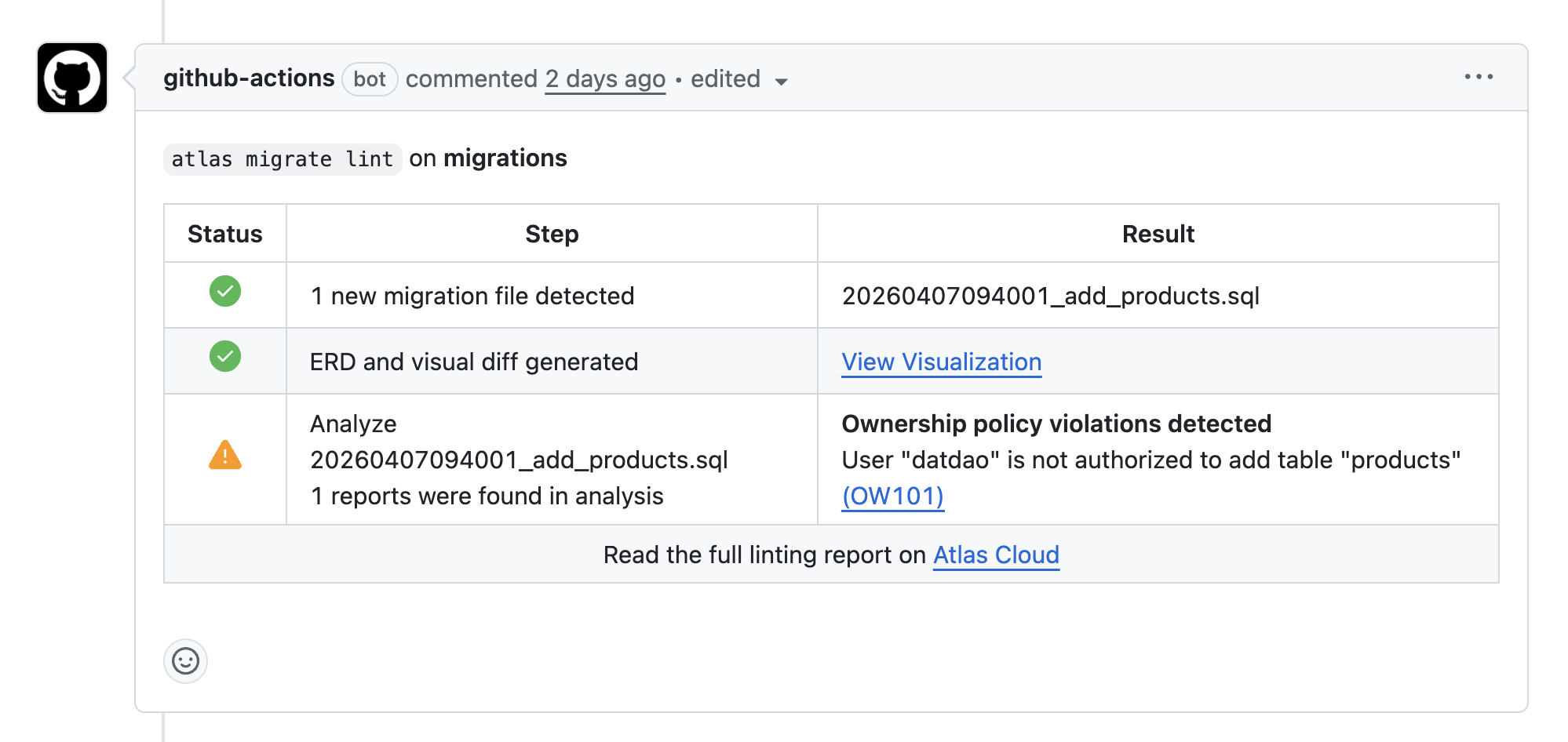
Specifically for Github users, you can configure ownership policy to enforce user and group permissions on schema objects.
File-level controls like CODEOWNERS protect repositories from unauthorized changes, but they cannot do the same for
schema changes. A single ALTER TABLE in the wrong place can cross boundaries without anyone noticing in review.
Ownership policy closes that gap by treating schema objects as the unit of authorization. You define allow and deny rules that match resources (schemas, tables, views, and more) and map them to GitHub users or teams. When Atlas plans or lints a change, it checks whether the author is permitted to touch every affected object and fails CI if the change does not comply.
In practice, it feels like CODEOWNERS for the database itself. The PR can still change the same files, but the pipeline will
block merges that reach across object boundaries. This isespecially useful when a helper script (or an AI assistant) generates
a schema diff that accidentally touches a core table.
Final Thoughts
Governance tooling is only useful when it connects to how your team actually ships. Policy-as-code for your schema is a practical way to make safe and consistent schema changes operational rather than aspirational.
As your product and databases grow, you will find yourself wanting to enforce more and more policies. Atlas ensures that you can do so without adding more to the migration review process.
Get Started
Schedule a demo to learn more about how you can use Atlas to automate database governance at scale with policy-as-code.