Versioned Schema Migrations with the Atlas Kubernetes Operator
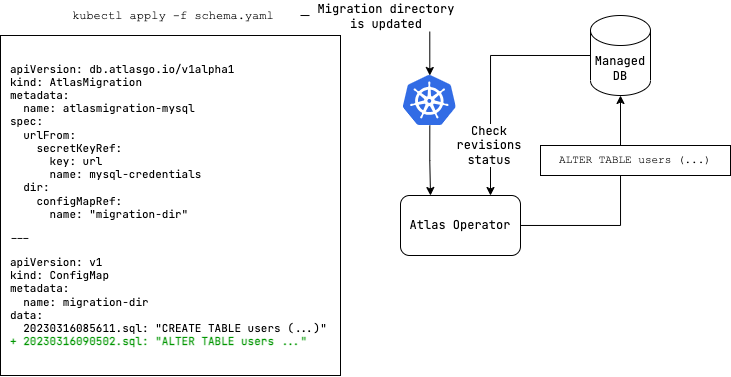
The Atlas Kubernetes Operator supports versioned migrations.
In versioned migrations, the database schema is defined by a series of SQL scripts ("migrations") that are applied
in lexicographical order. The user can specify the version and migration directory to run, which can be located
on the Atlas Cloud or stored as a ConfigMap in your Kubernetes
cluster.
In this workflow, after installing the Atlas Kubernetes Operator, the user defines the desired state of the database
as an AtlasMigration resource which connects between a target database and a migration directory. The migration directory
may be configured as a remote directory in Atlas Cloud or as a
ConfigMap in your Kubernetes cluster.
The operator then reconciles the desired state with the actual state of the database by applying any pending migrations on the target database.
This Document
This document describes the versioned workflow supported by the Atlas Kubernetes Operator. It covers the following topics:
- Providing Migrations: How to provide the migration files to the Atlas Operator.
- Providing Credentials: Different ways to provide the URL of the target database to the Atlas Kubernetes Operator.
- Safety Mechanisms: Ways to control the operator's behavior and prevent unwanted outcomes.
- Drift Detection: Detecting changes made to the database outside of the migration directory.
- API Reference: A reference guide to the
AtlasMigrationsresource.
Providing Migrations
The versioned workflow requires the user provide a valid Atlas Migration Directory. Migrations
are typically automatically generated by Atlas using the migrate diff but can be provided
manually as well.
This sections outlines the different ways in which users can provide a migration directory to the Atlas Operator.
From Schema Registry
The recommended way of providing the schema to the AtlasMigration resource is by referencing a schema stored in the
Atlas Schema Registry:
apiVersion: db.atlasgo.io/v1alpha1
kind: AtlasMigration
metadata:
  name: atlasmigration-sample
spec:
  url: "<db url>"
  cloud:
    tokenFrom:
      secretKeyRef:
        key: token
        name: atlas-credentials
  dir:
    remote:
      name: "atlas" # The name of the project on the Schema Registry
      tag: "commit-id" # When tag is not specified, the latest tag will be used
This is akin to specifying a tagged container image in a Kubernetes Deployment resource.
This approach has multiple benefits:
- Directory sizes are not limited by the Kubernetes API server's size constraints.
- Directories are produced by a CI/CD pipeline and treated as a build artifact, ensuring only validated schemas are applied.
- Directory states can be correlated with Git commits as tags, ensuring application code and database schema are aligned.
The Schema Registry is a hosted service provided by Atlas that stores and serves schemas to the Atlas Kubernetes Operator.
To facilitate access to the registry, the API token is stored in a Kubernetes secret and referenced in the
AtlasMigration resource.
To keep the cached Atlas Cloud grant across operator pod restarts, enable Helm persistence on the operator deployment.
For a full example see our two part blog post on GitOps for Databases (part 1) and GitOps for Databases (part 2).
From ConfigMap
The Atlas Operator supports defining the migration directory as ConfigMap
with key-value pairs where the key is the file name and the value is the content of the migration file.
apiVersion: v1
kind: ConfigMap
metadata:
  name: migration-dir
data:
  20230316085611.sql: |
    create table users (
      id int not null auto_increment,
      name varchar(255) not null,
      email varchar(255) unique not null,
      short_bio varchar(255) not null,
      primary key (id)
    );
  atlas.sum: |
    h1:sPURLhQRvLU79Dnlaw3aiU4KVkyUVEmW+ekenqu/V2o=
    20230316085611.sql h1:FKUFrD9E4ceSeBZ5owv2c05Ag8rokXGKXp53ZctbocE=
The AtlasMigration resource can then reference the relevant ConfigMap:
apiVersion: db.atlasgo.io/v1alpha1
kind: AtlasMigration
metadata:
  name: atlasmigration-sample
spec:
  urlFrom:
    secretKeyRef:
      key: url
      name: db-credentials
  dir:
    configMapRef:
      name: "migration-dir" # ConfigMap name of atlas-migration-configmap.yaml
Inline
The migration directory can also be provided inline in the AtlasMigration resource:
apiVersion: db.atlasgo.io/v1alpha1
kind: AtlasMigration
metadata:
  name: atlasmigration-sample
spec:
  urlFrom:
    secretKeyRef:
      key: url
      name: db-credentials
  dir:
dir:
  local:
    20230316085611.sql: |
      create table users (
        id int not null auto_increment,
        name varchar(255) not null,
        email varchar(255) unique not null,
        short_bio varchar(255) not null,
        primary key (id)
      );
    atlas.sum: |
      h1:sPURLhQRvLU79Dnlaw3aiU4KVkyUVEmW+ekenqu/V2o=
      20230316085611.sql h1:FKUFrD9E4ceSeBZ5owv2c05Ag8rokXGKXp53ZctbocE=
To access the migration folder from custom configuration you can use the url file://migrations.
Providing credentials
URLs
In order to manage the schema of your database, you must provide the Atlas Kubernetes Operator with an Atlas URL to your database. The Atlas Kubernetes Operator will use this URL to connect to your database and apply changes to the schema. As this string usually contains sensitive information, we recommend storing it as a Kubernetes secret.
Both AtlasSchema and AtlasMigration resources support defining the connection URL as a string (using the url field)
or as a reference to a Kubernetes secret (using the urlFrom field):
If you are connecting to a database that is running in your Kubernetes cluster, note that you should
you use a namespace-qualified DNS name to connect to it. Connections are made from the Atlas Kubernetes Operator's
namespace, so you should use a DNS name that is resolvable from that namespace. For example, to connect to the mysql
service in the app namespace use:
mysql://user:pass@mysql.app:3306/myapp
Schema and database bound URLs
Notice that depending on your use-case, you may want to use either a schema-bound or a database-bound connection.
- Schema-bound connections are recommended for most use-cases, as they allow you to manage the schema of a database
schema (named database). This is akin to selecting a specific database using a
USEstatement. - Database-bound connections are recommended for use-cases where you want to manage multiple schemas in a single database at once.
Create a file named db-credentials.yaml with the following contents:
- MySQL (Schema-bound)
- MySQL (DB-bound)
- PostgreSQL (Schema-bound)
- PostgreSQL (DB-bound)
apiVersion: v1
kind: Secret
metadata:
name: mysql-credentials
type: Opaque
stringData:
  url: "mysql://user:pass@your.db.dns.default:3306/myapp"
This defines a schema-bound connection to a named database called myapp.
apiVersion: v1
kind: Secret
metadata:
name: mysql-credentials
type: Opaque
stringData:
  url: "mysql://user:pass@your.db.com:3306/"
This defines a database-bound connection.
apiVersion: v1
kind: Secret
metadata:
name: pg-credentials
type: Opaque
stringData:
  url: "postgres://user:pass@your.db.com:5432/?search_path=myapp&sslmode=disable"
This defines a schema-bound connection to a schema called myapp to the default database (usually postgres).
apiVersion: v1
kind: Secret
metadata:
name: pg-credentials
type: Opaque
stringData:
  url: "postgres://user:pass@your.db.com:5432/?sslmode=disable"
Your URL scope must match the scope of your schema definitions. If your schemas use qualified statements
(e.g., CREATE FUNCTION myschema.myfunc()) or operate across multiple schemas, use a database-bound URL.
For example, if the URL includes search_path (PostgreSQL) or a schema name (MySQL), Atlas limits its scope to that single schema.
A mismatch can cause errors such as "already exists" or unexpected behavior when applying or reverting changes.
For more details, see Schema vs. Database scope.
For examples of URLs for connecting to other supported databases see the URL docs
urlFrom
The urlFrom field is used to load the URL of the target database from another resource such as a
Kubernetes secret.
urlFrom:
    secretKeyRef:
      key: url
      name: mysql-credentials
url
The url field is used to define the URL of the target database directly. This is not recommended, but may
be useful for testing purposes.
url: "mysql://user:pass@localhost:3306/myapp"
credentials object
Alternatively, you can provide the credentials for your database as a credentials object.
apiVersion: db.atlasgo.io/v1alpha1
kind: AtlasSchema
metadata:
  name: atlasschema-postgres
spec:
  credentials:
    scheme: postgres
    host: postgres.default
    user: root
    passwordFrom:
      secretKeyRef:
        key: password
        name: postgres-credentials
    database: postgres
    port: 5432
    parameters:
      sslmode: disable
  # ... rest of the resource
Note: hostFrom and userFrom are also supported to load the host and user from another resource.
When using the config or configFrom fields with an env block that defines the database url
(for example, when using aws_rds_token for IAM authentication),
the credentials, url, and urlFrom fields in the resource spec are ignored.
See Using Custom Project Configuration for examples of using IAM authentication and other advanced configurations.
Safety
The Operator applies pending migrations, and refuses to revert them unless told otherwise. Reverting is detected when
the migration directory holds fewer files than the database has applied, for example after rolling a deployment back
to an earlier tag. In that case the resource stops with ProtectedFlowError until
protectedFlows.migrateDown.allow is set.
Allowing down migrations does not require approval on its own. For directories served from the registry, the
migration approval policy decides whether a human must sign off before the
revert runs, and autoApprove cannot be used to bypass it.
Migrations themselves are best checked before they reach a cluster. Run migrate lint in CI so
destructive and backwards-incompatible changes are caught while the directory is still a pull request. For a
walkthrough of all of the above, see the
Versioned Quickstart.
Registry directories also support policy.drift, which prompts the operator to verify that the database
still matches the state of its last applied migration right before applying, and blocks the deployment if this check
fails. See Drift Detection.
Drift Detection
The operator detects drift, changes made to the database outside of the migration directory, in two ways:
- Pre-apply:
policy.drifton theAtlasMigrationresource checks the database right before pending migrations are applied, and can block the deployment. It runs only when a deployment runs. - Scheduled: an
AtlasDriftCheckresource runsatlas migrate driftagainst the database of anAtlasMigrationon an interval, and reports the result through its status, conditions, and Kubernetes events. It detects changes made between deployments and never modifies the database.
See our Drift Detection doc for versioned migrations for more context.
AtlasDriftCheck
apiVersion: db.atlasgo.io/v1alpha1
kind: AtlasDriftCheck
metadata:
  name: myapp-drift
spec:
  targetRef:
    name: myapp # An AtlasMigration in the same namespace.
  interval: 5m
  onDrift: Report # Report (default) or Fail
  exclude:
    - "public.audit_*"
    - "*[type=extension]"
The check authenticates with the target's cloud.tokenFrom, which references an Atlas bot token. The
target must be an AtlasMigration in the same namespace. Environments that use for_each are not supported. The
check does not watch the target, so changes to it, such as a new dev URL, take effect on the next scheduled check.
While the target is applying migrations, or a deployment holds the database lock, the check keeps its last result
and retries after about 30 seconds. When a check cannot run, Drifted becomes Unknown and the last result is
kept. Errors that need a configuration change, such as a missing target or a local directory without a dev
database, also set Stalled=True and are retried at the configured interval.
| Field | Default | Description |
|---|---|---|
targetRef.name | Required. The name of the AtlasMigration to check. | |
interval | 5m | Time between checks. The minimum is 1m. A random delay of up to 10% is added to spread checks over time. |
timeout | 5m | Maximum time allowed for a single check. |
suspend | false | Pauses scheduled checks and keeps the last result. |
onDrift | Report | Report sets Drifted=True and keeps Ready=True. Fail also sets Ready=False and Stalled=True. |
exclude | Glob patterns of objects to ignore, using the syntax of atlas schema inspect --exclude. Defaults to the target's policy.drift.exclude. When set, it replaces that list rather than extending it. |
Expected state
To detect drift, the check compares the database with the schema the migration directory defines at the version
the database is on, its expected state. Migrations that have not been applied yet are pending, not drift. The
check reads the expected state from the registry or computes it locally, depending on how the target
AtlasMigration is configured, and records the mode it used in status.mode.
- Registry directory
- Local directory
When the target uses dir.remote, Atlas reads the state of the applied version from the
Atlas Registry. This is the registry mode, and it needs no extra configuration on the
target.
The registry stores this state only for versions pushed without a tag. A push with --tag uploads the migration
files only. If the registry holds no state for the applied version, the check needs a dev database to fall back
to, as described in the next tab.
When the target uses a ConfigMap or an inline directory, there is no stored state
to read. Atlas replays the migration directory, up to the applied version, on a
dev database and compares the result with the target database. This is the local mode.
The dev database comes from the target's devURL or devURLFrom. The operator does not create one
for the check, so set it on the AtlasMigration:
apiVersion: db.atlasgo.io/v1alpha1
kind: AtlasMigration
metadata:
  name: myapp
spec:
  urlFrom:
    secretKeyRef:
      key: url
      name: db-credentials
  devURLFrom:
    secretKeyRef:
      key: devURL
      name: db-credentials
  dir:
    configMapRef:
      name: migrations
The scope of the dev database URL must match the scope of the target URL. See URLs.
A registry directory with a dev URL uses both: when the registry holds no state for the applied version, Atlas
falls back to replaying the directory and status.mode is local.
Status and events
The result of the latest check is stored on the resource. The status holds the applied version, the
expected-state mode, a summary of the drifted objects, and the time of the check, and
kubectl get atlasdriftchecks lists them as columns.
The Drifted condition states whether the database matched its expected state. When it did not, the message
counts the drifted objects by kind and by object type. extra objects exist only in the database, missing
objects exist only in the expected state, and modified objects exist in both but differ:
Drifted=False  NoDrift: no drift detected at version 20250901000000
Drifted=True   DriftDetected: 2 drifted objects (extra 1, modified 1) at version 20250901000000: table 2
onDrift controls how drift affects readiness. With Report, the resource stays Ready and drift shows up only
in Drifted. With Fail, drift also turns Ready to False and marks the resource Stalled, so tools that
track readiness treat a drifted database as an unhealthy resource.
The check also emits Kubernetes events, but only when the result changes. A database that stays drifted across
many checks produces one DriftDetected event, not one per check, so events can feed alerts without
deduplication:
| Event | Type | Emitted when |
|---|---|---|
DriftDetected | Warning | A clean database is found drifted. |
DriftChanged | Warning | The database is still drifted, but a different set of objects drifted. |
DriftResolved | Normal | A drifted database matches its expected state again. |
CheckFailed | Warning | A check could not run. A repeat of the same failure does not emit a new event. |
kubectl get events --field-selector involvedObject.kind=AtlasDriftCheck
The status and events tell you that the database drifted and which kinds of objects changed, but not the exact
changes. To see the drifted objects and the DDL that reproduces them, run
atlas migrate drift against the database.
API Reference
Example AtlasMigration Resource
apiVersion: db.atlasgo.io/v1alpha1
kind: AtlasMigration
metadata:
  name: atlasmigration-sample
spec:
  envName: prod # Logs reported to Atlas cloud with this env name.
  revisionsSchema: atlas_schema_revisions # For database bound connections, controls the schema for the history table.
  urlFrom:
    secretKeyRef:
      key: url
      name: db-credentials
  cloud:
    tokenFrom:
      secretKeyRef:
        key: token
        name: atlas-credentials
  dir:
    remote:
      name: "atlas" # Migration directory name in your atlas cloud project
      tag: "commit-id" # When tag is not specified, the latest tag will be used
url / urlFrom
See the Credentials section for more information on how to provide the URL of the target database.
devURL
Atlas relies on a dev-database to normalize schemas and make various
calculations. By default, the operator will spin a new database pod to use as the dev-database.
However, if you have special requirements (such as have it preloaded with certain extensions or configuration),
you can use the devURL field to specify a URL to use as the dev-database.
devURL: mysql://root:password@dev-db-svc.default:3306/dev
devURLFrom
Alternatively, you can use the devURLFrom field to specify a key in a Secret that contains the dev-database URL.
devURLFrom:
  secretKeyRef:
    key: dev-url
    name: myapp
devDB
If you want to use a custom dev-database, you can specify the devDB field. The value of the spec field
is a Kubernetes PodSpec specification that will be used to create the dev-database pod.
Note that if a custom dev-database spec is provided, the devURL field is required as well.
The "hostname" part of the devURL value can be any valid name, such as localhost. The operator will
replace the hostname with the actual pod IP address after it is deployed, so the provided value does not matter.
  devURL: mysql://root:pass@localhost:3306/dev
  devDB:
    spec:
      containers:
        - name: mysql-dev
          image: mysql:latest
          env:
            - name: MYSQL_ROOT_PASSWORD
              value: pass
            - name: MYSQL_DATABASE
              value: dev
          ports:
            - containerPort: 3306
              name: mysql
          startupProbe:
            exec:
              command: [ "mysql", "-ppass", "-h", "127.0.0.1", "-e", "SELECT 1" ]
            failureThreshold: 30
            periodSeconds: 10
envName
Controls the environment name reported to Atlas Cloud for deployment runs. Available only when using a remote
type directory. Defaults to kubernetes.
envName: prod
config / configFrom
The config field is a string that contains the configuration in HCL format.
The configFrom field is a reference to a secret that contains the configuration in HCL format.
Using custom configuration enables advanced features like data sources
(e.g., aws_rds_token for IAM authentication),
composite_schema, and more.
For complete examples, see Using Custom Project Configuration.
Using unnamed env blocks with name = atlas.env
When using the config field, you can define an unnamed env block that dynamically takes its name from the
envName field in the resource spec. This is useful when reusing the same configuration across multiple
environments:
spec:
  envName: "prod"  # This value is passed to `atlas.env`
  config: |
    env {
      name = atlas.env  # Resolves to "prod" at runtime
      url  = "postgres://..."
    }
This is equivalent to defining env "prod" { ... } but allows the environment name to be set dynamically.
When the config block defines the database url inside an env block, the credentials, url, and urlFrom
fields in the resource spec are ignored. Use one approach or the other, not both.
vars
You can use vars in the configuration to make it more dynamic.
- Key-Pair
- Secret
- ConfigMap
spec:
  envName: "prod"
  vars:
    - key: "url"
      value: "postgres://user:password@localhost:5432/db"
  config: |
    variable "url" {
      type = string
    }
    env "prod" {
      url = var.url
    }
spec:
  envName: "prod"
  vars:
    - key: "url"
      valueFrom:
        secretKeyRef:
          name: secret-creds
          key: url
  config: |
    variable "url" {
      type = string
    }
    env "prod" {
      url = var.url
    }
spec:
  envName: "prod"
  vars:
    - key: "url"
      valueFrom:
        configMapKeyRef:
          name: configmap-creds
          key: url
  config: |
    variable "url" {
      type = string
    }
    env "prod" {
      url = var.url
    }
baseline
Sets the baseline migration for the target database. This is used when deploying Atlas to an existing database that was not previously managed by Atlas. See the docs for baseline migrations.
baseline: "20220811074144"
execOrder
Controls how Atlas computes and executes pending migration files to the database. Supports three values:
linear(default)linear-skipnon-linear
For a technical explanation about the different modes see Applying Migrations.
protectedFlows.migrateDown
Controls the operator's behavior when encountering a down migration (i.e., the target revision is lower than the
current). The operator detects this case when the migration directory (ConfigMap, inline, or remote) contains fewer
migration files than the database has applied — for example, after reverting a ConfigMap to a previous version.
To trigger a down migration with the operator:
- Enable down migrations in your
AtlasMigrationresource (see fields below). - Update your migration source (e.g., revert the ConfigMap) to remove the newer migration files while keeping the older ones intact.
- The operator detects that the database version is ahead of the directory and runs
migrate downto revert to the target version.
Down migrations revert schema changes (DDL) by default. To also revert data changes, configure
data.mode in your project configuration: use SYNC to delete inserted
rows, or UPSERT to revert updates.
The Atlas Kubernetes Operator does not support a dry-run mode. To preview migration changes before applying, use the
Atlas CLI with the --dry-run flag. Validate migrations in your CI pipeline before updating
the operator's migration directory.
- Secret
- Inline
spec:
  envName: "prod"
  configFrom:
    secretKeyRef:
      key: config
      name: my-secret
spec:
  envName: "prod"
  config: |
    env "prod" {
      ...
    }
allow
protectedFlows:
  migrateDown:
    allow: true
Allows down migrations for the AtlasMigration resource. Must be set to true for the operator to execute down
migrations.
autoApprove
protectedFlows:
  migrateDown:
    autoApprove: true
When set to true, skips approval flows for down migrations. Not allowed for remote directories.
policy.drift
Enables the Atlas pre-apply drift check for the resource. Before
applying pending migrations, Atlas compares the state of the target database with the latest applied version
held by the Atlas Registry. If the database was changed outside of the migration
directory, the deployment is either blocked (onError: FAIL) or the drift is logged and the
migrations are applied anyway (onError: CONTINUE).
spec:
  dir:
    remote:
      name: "atlas"
      tag: "commit-id"
  cloud:
    tokenFrom:
      secretKeyRef:
        key: token
        name: atlas-credentials
  policy:
    drift:
      onError: FAIL # FAIL (default) or CONTINUE
      exclude: # Optional. Replaces the env-level exclude list.
        - "public.audit_*"
        - "*[type=extension]"
The operator renders the policy into the atlas.hcl it generates for the resource, so the check behaves exactly
as it does for the CLI:
env "kubernetes" {
  url = "..."
  migration {
    dir = "atlas://atlas?tag=commit-id"
  }
  check "migrate_apply" {
    drift {
      on_error = FAIL
      exclude  = ["public.audit_*", "*[type=extension]"]
    }
  }
}
Requirements
- The migration directory must be served from the registry (
dir.remote), because the expected state is read from the registry. Other directory types are rejected with aReadingMigrationDatacondition. - An Atlas Pro token (
cloud.tokenFrom), as for any registry directory.
Semantics
onError:FAIL(default) aborts the deployment before any migration file runs.CONTINUEapplies the migrations anyway.exclude: glob patterns of database objects to ignore, using the same syntax asatlas schema inspect --exclude. When set, it replaces the env-levelexcludelist rather than extending it. The revisions table is always excluded. See Excluding Objects for patterns and use cases.- The check is skipped on a fresh database and when the applied version is not found in the registry. For
example, when the history was applied from a
ConfigMapbefore the directory moved to the registry.
The operator runs migrate apply only when the directory has pending migrations, so the check runs when a new
version is deployed. It is a deployment gate, not a monitor: a database that drifts while nothing is pending is
not reported until the next deployment. To check for drift between deployments, use an
AtlasDriftCheck resource.
When drift blocks a deployment
The Ready condition turns False with the reason DriftDetected and the error returned by Atlas as the
message. The resource is marked Stalled, a Warning event with the same reason is emitted, and the operator
retries with a growing delay until backoffLimit is reached. After that, a change to the
resource is needed to resume.
$ kubectl get atlasmigrations
NAME   READY   REASON
app    False   DriftDetected
To recover, do one of the following:
- Revert the out-of-band change. The next retry passes.
- Add an
excludepattern for objects that intentionally live outside of the migration directory. - Fold the change into the migration history: set
onError: CONTINUE, deploy an idempotent migration that applies the change, then switch back toFAIL.
Only a blocked deployment is visible in Kubernetes. With onError: CONTINUE, or when the check is skipped, the
resource becomes Ready as usual and neither the condition nor the events mention the drift. The condition
message contains the Atlas error, not the diff. To see which objects drifted, run
atlas migrate drift against the database.
Custom configuration
If config or configFrom also defines a check "migrate_apply" block with a drift
block inside the env block, the two are merged the way other generated settings are: attributes set in the
configuration take precedence over policy.drift, and the operator emits a DriftPolicyOverridden warning
event. A check "migrate_apply" block at the top level of the configuration is an additional check that Atlas
evaluates as well.
revisionsSchema
The revisionsSchema field is used to define the schema name for the revisions table.
Details about the revisions table can be found in the Revisions Schema.
revisionsSchema: "atlas"
backoffLimit
The backoffLimit field is used to define the number of retries the operator will attempt
if a reconciliation fails. default is 20.
backoffLimit: 5