Atlas Registry
Atlas Registry allows you to store, version, and maintain a single source of truth for your database schemas, database migrations, and additional assets related to schema changes. It is like Docker Hub for Atlas schemas and migrations.
Getting Started
Pushing a Schema
The atlas schema push command allows you to push your schema definition to the Atlas Registry. If no repository exists
in the registry for the schema, a new one is created. Otherwise, a new version is generated.
- PostgreSQL
- MySQL
- MariaDB
- SQLite
- SQL Server
- ClickHouse
- Redshift
- Snowflake
- YugabyteDB
- Azure HorizonDB
atlas schema push myapp \
  --dev-url "docker://postgres/15/dev?search_path=public" \
  --url "file://schema.sql"
atlas schema push myapp \
  --dev-url "docker://mysql/8/dev" \
  --url "file://schema.sql"
atlas schema push myapp \
  --dev-url "docker://mariadb/latest/dev" \
  --url "file://schema.sql"
atlas schema push myapp \
  --dev-url "sqlite://dev?mode=memory" \
  --url "file://schema.sql"
atlas schema push myapp \
  --dev-url "docker://sqlserver/2022-latest" \
  --url "file://schema.sql"
atlas schema push myapp \
  --dev-url "docker://clickhouse/23.11" \
  --url "file://schema.sql"
atlas schema push myapp \
  --dev-url "redshift://user:pass@redshift-cluster:5439/dev" \
  --url "file://schema.sql"
atlas schema push myapp \
  --dev-url "snowflake://user:pass@account_identifier/dev" \
  --url "file://schema.sql"
atlas schema push myapp \
  --dev-url "docker://ysql/latest/dev?search_path=public" \
  --url "file://schema.sql"
atlas schema push myapp \
  --dev-url "docker://postgres/17/dev?search_path=public" \
  --url "file://schema.sql"
For the purpose of this example, we have named our schema myapp, but you can choose a
different name containing only alphanumeric characters, dashes, and underscores.
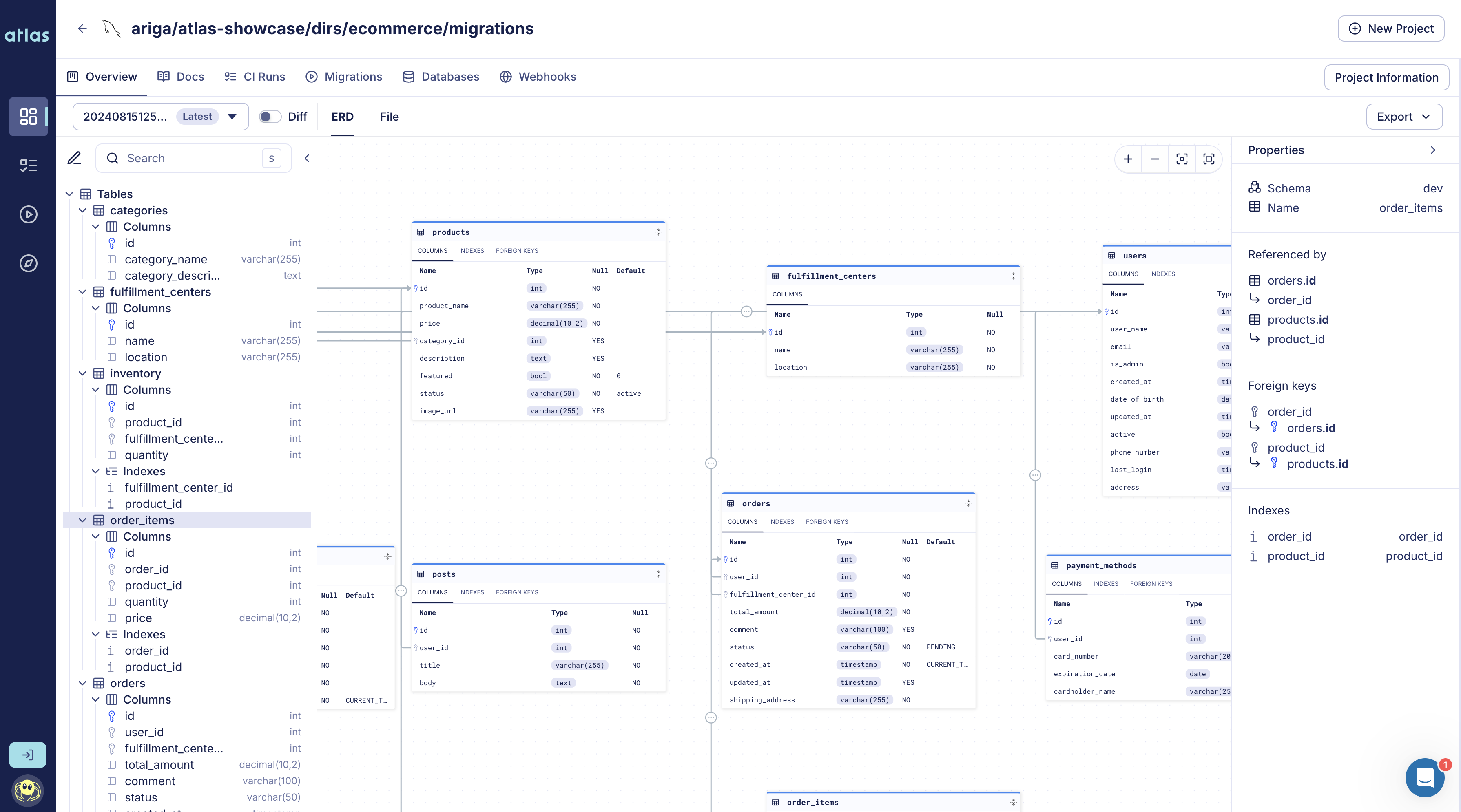
Migration Directory created with atlas migrate push
Registry Config for Schemas
The example below demonstrates how to configure the registry for your schema within an env block. All commands
executed in this environment will automatically use the configured repository:
env "local" {
  # URL to the underlying database.
  url = getenv("DATABASE_URL")
  # URL to the dev-database.
  dev = "sqlite://dev?mode=memory"
  schema {
    # Desired schema state.
    src = "file://schema.sql"
    # Atlas Registry config.
    repo {
      name = "myapp"
    }
  }
}
Pushing a Migration Directory
The atlas migrate push command allows you to push your migration directory to the Atlas Registry. If no repository
exists in the registry for the pushed directory, a new one is created. Otherwise, the directory state will be updated.
- PostgreSQL
- MySQL
- MariaDB
- SQLite
- SQL Server
- ClickHouse
- Redshift
- Snowflake
- YugabyteDB
- Azure HorizonDB
atlas migrate push myapp \
  --dev-url "docker://postgres/15/dev?search_path=public"
atlas migrate push myapp \
  --dev-url "docker://mysql/8/dev"
atlas migrate push myapp \
  --dev-url "docker://mariadb/latest/dev"
atlas migrate push myapp \
  --dev-url "sqlite://dev?mode=memory"
atlas migrate push myapp \
  --dev-url "docker://sqlserver/2022-latest"
atlas migrate push myapp \
  --dev-url "docker://clickhouse/23.11"
atlas migrate push myapp \
  --dev-url "redshift://user:pass@redshift-cluster:5439/dev"
atlas migrate push myapp \
  --dev-url "snowflake://user:pass@account_identifier/dev"
atlas migrate push myapp \
  --dev-url "docker://ysql/latest/dev?search_path=public"
atlas migrate push myapp \
  --dev-url "docker://postgres/17/dev?search_path=public"
For the purpose of this example, we have named our migration directory myapp, but you can choose a
different name containing only alphanumeric characters, dashes, and underscores.
Once pushed, the migration directory is available to others in your organization and can be referenced in your deployment pipelines.
Note that Atlas Registry is schema-aware. In addition to storing and versioning your migrations, it provides ER diagrams, SQL diffing, schema docs, and other capabilities that make working with your schema easier.
Registry Config for Migration Directories
The example below demonstrates how to configure the registry for your migration directory within an env block.
All commands executed in this environment will automatically use the configured repository:
env "local" {
  # URL to the underlying database.
  url = getenv("DATABASE_URL")
  # URL to the dev-database.
  dev = "sqlite://dev?mode=memory"
  # URL to the desired schema state.
  src = "file://schema.sql"
  migration {
    # Atlas Registry config.
    repo {
      name = "myapp"
    }
  }
}
Backup Repositories
Backup repositories replicate Atlas Registry assets to your own storage and allow eligible atlas:// reads to fall back when Atlas Cloud is unavailable.
Schemas
Use schema.repo.backup to replicate each atlas schema push:
env "local" {
  # URL to the underlying database.
  url = getenv("DATABASE_URL")
  # URL to the dev-database.
  dev = "sqlite://dev?mode=memory"
  schema {
    # Desired schema state.
    src = "file://schema.sql"
    repo {
      name = "myapp"
      backup = ["s3://my-bucket/atlas-backup?region=us-east-1"]
    }
  }
}
When schema.src uses an atlas:// URL in the same environment, Atlas can fall back to backups on fallback-eligible Atlas Cloud read errors. See the BCM/BCP for Declarative Schemas guide for end-to-end setup.
Migration Directories
Use migration.repo.backup to replicate each atlas migrate push:
env "local" {
  # URL to the underlying database.
  url = getenv("DATABASE_URL")
  # URL to the dev-database.
  dev = "sqlite://dev?mode=memory"
  migration {
    dir = "file://migrations"
    repo {
      name = "myapp"
      backup = ["s3://my-bucket/atlas-backup?region=us-east-1"]
    }
  }
}
When migration.dir uses an atlas:// URL in the same environment, Atlas can fall back to backups on fallback-eligible Atlas Cloud read errors. See the Registry Backups for Versioned Migrations guide for end-to-end setup.
Backup Provider URLs
The migration.repo.backup and schema.repo.backup fields accept blob bucket URLs. Atlas currently supports common providers such as AWS S3, Google Cloud Storage, and Azure Blob Storage.
- AWS S3
- Google Cloud Storage
- Azure Blob Storage
env "prod" {
  migration {
    repo {
      name = "app"
      backup = [
        "s3://my-atlas-backups/migrations?region=us-east-1",
      ]
    }
  }
}
Authentication options:
- Standard AWS credentials via environment variables (
AWS_ACCESS_KEY_ID,AWS_SECRET_ACCESS_KEY, optionallyAWS_SESSION_TOKEN). - Shared config/credentials files (
~/.aws/credentials,~/.aws/config). - IAM role when running on AWS infrastructure.
env "prod" {
  migration {
    repo {
      name = "app"
      backup = [
        "gs://my-atlas-backups/migrations",
      ]
    }
  }
}
Authentication options:
- Application Default Credentials.
- Service account key via
GOOGLE_APPLICATION_CREDENTIALS. - Workload identity when running on GCP.
env "prod" {
  migration {
    repo {
      name = "app"
      backup = [
        "azureblob://my-container/migrations?storage_account=myaccount",
      ]
    }
  }
}
Authentication options:
AZURE_STORAGE_ACCOUNT+AZURE_STORAGE_KEY.AZURE_STORAGE_ACCOUNT+AZURE_STORAGE_SAS_TOKEN.- Azure managed identity / default Azure credentials.
Simplifying Deployments
When you push a migration directory to the Schema Registry, you can give it a tag in the same way that you would tag a Docker image. This makes any version of your schema effectively addressable which dramatically simplifies deployments.
References to a schema version can then be used in your deployment pipelines with an expression similar to:
# Reference by version
atlas migrate apply \
    --dir "atlas://myapp?version=20231201182011" \
    --url "postgres://postgres:pass@:5432/example?search_path=public&sslmode=disable"

# Reference by tag
atlas migrate apply \
  --dir "atlas://app?tag=39e7e4e35fce7409bd26d25d8140061695d4ffd5" \
  --url "postgres://postgres:pass@:5432/example?search_path=public&sslmode=disable"
Using the Schema Registry completely eliminates the need to create custom Docker images for migrations or grant your runtime environments access to your source code repository.
Example: Kubernetes Deployment
Let's see how we can use tagged schema versions in a Kubernetes deployment:
apiVersion: db.atlasgo.io/v1alpha1
kind: AtlasMigration
metadata:
  name: migration
spec:
  urlFrom:
    secretKeyRef:
      key: url
      name: postgres-credentials
  cloud:
    project: "atlasdemo" # Atlas Cloud project name
    tokenFrom:
      secretKeyRef:
        name: atlas-credentials
        key: token
  dir:
    remote:
      name: "myapp" # Migration directory name in your atlas cloud project
      tag: "39e7e4e35fce7409bd26d25d8140061695d4ffd5" # See below on how to obtain this value for your project.
For the full walkthrough of managing your schema in Kubernetes, see the Atlas Kubernetes Operator docs.
Example: Terraform
You can also use references to the Schema Registry in your Terraform modules:
resource "atlas_migration" "myapp" {
  url = "postgres://postgres:pass@:5432/example?search_path=public&sslmode=disable"
  remote_dir {
    name = "myapp"
    tag  = "39e7e4e35fce7409bd26d25d8140061695d4ffd5"
  }
}
For the full walkthrough of managing your schema with Terraform, see the Atlas Terraform Provider docs.
Managing Repositories from the CLI
In addition to atlas schema push and atlas migrate push, you can create and inspect Registry repositories directly
from the CLI using the atlas cloud repo commands.
Creating a Repository
Use atlas cloud repo create to create a new, empty repository in the Atlas Registry (without pushing any schema or
migration artifacts). A repository is either of type schema or migration_directory, and is bound to a database driver:
atlas cloud repo create --type migration_directory --name myapp --driver postgres
Slug               myapp
Title              My App
Type               MIGRATION_DIRECTORY
URL                atlas://myapp
Driver             postgres
Databases Synced   0
Databases Failed   0
Databases Pending  0
By default, the command returns an error if the repository already exists. Pass --skip-if-exists to treat an existing
repository as a no-op (the command prints a notice to stderr and exits successfully), which is useful in idempotent
provisioning scripts.
Listing Repositories
atlas cloud repo list prints the repositories available to you, with a summary of their target databases, grouped by
sync status:
atlas cloud repo list
                                ────── DATABASES ──────
SLUG       TYPE                 SYNCED  FAILED  PENDING
payments   MIGRATION_DIRECTORY      42       3        1
inventory  SCHEMA                    7       0       12
billing    MIGRATION_DIRECTORY       0       0        0
--------------------------------
Page: 1  Page Size: 6  Total: 18
Describing a Repository
atlas cloud repo describe shows a single repository, selected by --slug, --id, or --name:
atlas cloud repo describe --slug payments
Slug               payments
Title              Payments
Type               MIGRATION_DIRECTORY
URL                atlas://payments
Driver             mysql
Databases Synced   5
Databases Failed   0
Databases Pending  1
Every atlas cloud command accepts a --format flag that takes a Go template to shape the output (for example,
emitting JSON with --format '{{ json . }}'). List commands are paginated via --page. See the
CLI reference for the full set of flags.