Atlas vs schemachange: Snowflake Schema Management
Traditional manual database deployment methods often become more challenging to maintain as pipelines become more complex. Modern database development requires deterministic planning, end-to-end automation, and guardrails that prevent outages.
Atlas provides a schema-as-code engine that supports both declarative and versioned workflows with automatic diff-based planning, linting and policy checks, and CI/CD integrations.
schemachange provides a versioned workflow, applying ordered migration files that you write to your Snowflake databases.
This guide compares the two tools for Snowflake so you can choose the right level of automation, governance, and platform integration for your team.
This document is maintained by the Atlas team and was last updated in May 2026. It may contain outdated information or mistakes. For schemachange's latest behavior and documentation, refer to the schemachange project.
Quick Comparison
| Feature / Capability | Atlas | schemachange |
|---|---|---|
| Workflows | Declarative (state-based) and versioned (migrations-based) | Versioned SQL scripts executed in order |
| Schema Definition | Schema files in HCL or SQL. Can also load from ORMs, database URLs, or a mix of these sources | Plain SQL with optional Jinja |
| Migration Planning | Automatic diff-based planning with policy enforcement | You author migration scripts |
| Rollback / Down Migrations | Dynamic, state-aware rollback with safety checks | Manually write and apply down scripts |
| Safety and Linting | Built-in analyzers, linting commands, policy checks, CI/CD enforcement | ☒ |
| Testing | Unit-style schema and migration tests, locally and in CI | ☒ |
| Policy Enforcement | Define custom rules (e.g., naming conventions, constraints) in project config | ☒ |
| Migration Integrity | Validates migration directory state to prevent branch conflicts and untracked changes | ☒ |
| Drift Detection | Receive alerts when drift is detected between the live schema and desired state | ☒ |
| CI/CD Integration | Native actions for GitHub, GitLab, Azure DevOps, Bitbucket, CircleCI | Python CLI in pipelines |
| Registry and Docs | Atlas Cloud with auto-generated schema docs, ERDs, column-level lineage, SOC2-audited history, PR checks | Artifact is your Git repo and Snowflake metadata tables |
| Kubernetes / Terraform | Kubernetes Operator with CRDs; Terraform provider | Out of scope |
| Runtime | Distributed as a static Go binary and Docker image (~63 MB) | Python-based CLI; requires Python 3.8 or later |
Migration Workflows
Unlike schemachange, where you write and maintain ordered SQL migration files manually, Atlas automates migration planning based on the difference between the current and desired states.
Current State vs Desired State
- Current state: In the declarative workflow (Terraform-like workflow), the current state is typically a live database. In the versioned workflow, the current state is the result of applying all migration files in order.
- Desired state: The desired state defines the target schema. It can be defined using HCL schema files, SQL schema files, another database, ORM providers, or a combination of these sources.
Declarative vs Versioned Workflows
Atlas supports two workflows for managing schema changes: declarative (state-based) and versioned (migrations-based). In both workflows, Atlas inspects the current state, compares it to the desired state, and plans the necessary statements to reach the desired state using a single deterministic migration planner.
- Declarative: Atlas compares the desired state to the current database, plans safe migrations based on defined policies, and applies them automatically on the target database.
- Versioned: Instead of writing the SQL yourself, Atlas generates migration files that transition the current state of the migrations directory to the desired state.
Both workflows can be automated in CI/CD using Atlas Actions (GitHub, GitLab, Azure DevOps, etc.) or the Atlas CLI. After changes are planned, Atlas validates them with migration linting and policy checks before execution.
Read more at:
- Snowflake automatic migrations
- Schema as Code: SQL syntax
- Schema as Code: HCL syntax
- ORM integrations
Migration Safety, Policy, and Governance
Atlas treats database schemas as code. Before you apply changes, analyzers can flag destructive operations (e.g., dropping tables or columns), naming violations, and incompatible edits. Those checks run locally and in CI so issues surface before deployment.
- Custom policies enforce team conventions and guardrails (e.g., naming rules, forbidden object types, compliance requirements) in project configuration so planning, lint, and apply stay aligned.
- Pre-migration checks are SQL assertions embedded in migrations (e.g., verify a table is empty before dropping it). If a check fails, the migration aborts.
- Migration directory integrity helps prevent merge churn and forked histories when several branches touch the same migration folder.
schemachange ships without a built-in semantic analyzer, requiring manual code review, staging deploys, checklists, and CI steps you maintain.
Read more at:
Down Migrations and Rollback
Rolling back a failed statement and going down to an older migration version are different and important concepts:
- Rollback happens at the transaction level. If a migration fails in a database that supports transactional DDLs, the entire transaction is aborted and the schema returns to its pre-migration state. On databases without transactional DDLs (like Snowflake), a failed migration may leave the schema partially applied.
- Going Down refers to intentionally reverting previously applied migrations to reach an earlier version or tag. This requires the migration tool to understand the database state and apply reverse changes across multiple files. The tool must generate a short, safe sequence of statements that revert the schema to the desired state, even if the last migration was partially applied or failed.
Atlas automatically generates the sequence of statements required to revert toward a prior version or tag. This process works even if the last migration was partially applied or failed, and pre-migration checks are run by default to prevent destructive operations. You can review the plan with a dry run before applying it and enforce review or approval in CI or Atlas Cloud when policy requires it.
With schemachange, rolling back a release usually means either writing, testing, and applying a reverse SQL script, or using clones, time travel, and runbooks. The process is manual and does not promise a safe revert to an old version.
Read more:
CI/CD and GitOps
Atlas is designed for modern CI/CD workflows and integrates deeply with popular tools:
- Kubernetes and Terraform: A Kubernetes operator and Terraform provider let you manage schema changes declaratively alongside your infrastructure. This enables GitOps-style deployments where the database state is version-controlled and automatically applied, just like application code or infrastructure settings.
- CI/CD integrations: GitHub, GitLab, CircleCI, Bitbucket, and Azure DevOps actions allow for easy integration. They support all Atlas workflows, provide PR/code comments, run summaries, and can enforce policies or block merges if migration linting fails.
 Kubernetes
 Terraform
 GitHub Actions
 GitLab CI
 Azure DevOps
 CircleCI
 Bitbucket
schemachange is typically added to pipelines as a Python step: install dependencies, pass Snowflake connection settings, and deploy against the target account. Reviewing changes on pull requests, restricting applies to protected branches, and adding manual approvals are entirely matters of branch rules and pipeline design.
Atlas Cloud: Registry, Docs, and Drift Monitoring
Pushing Snowflake schema and migration artifacts into Atlas Cloud makes the repository browsable and auditable. Every push refreshes diagrams, docs, and history without requiring broad write access to production.
- Schema Registry: A central store for schema versions and migration directories. Each push generates an ER diagram, searchable documentation, and SOC2-audited history of schema and migration changes.
- Column-level lineage: Trace how columns are derived across tables, views, and datasets.
- Pull request checks: Run the same linters and policy checks in CI and block merges if rules are violated.
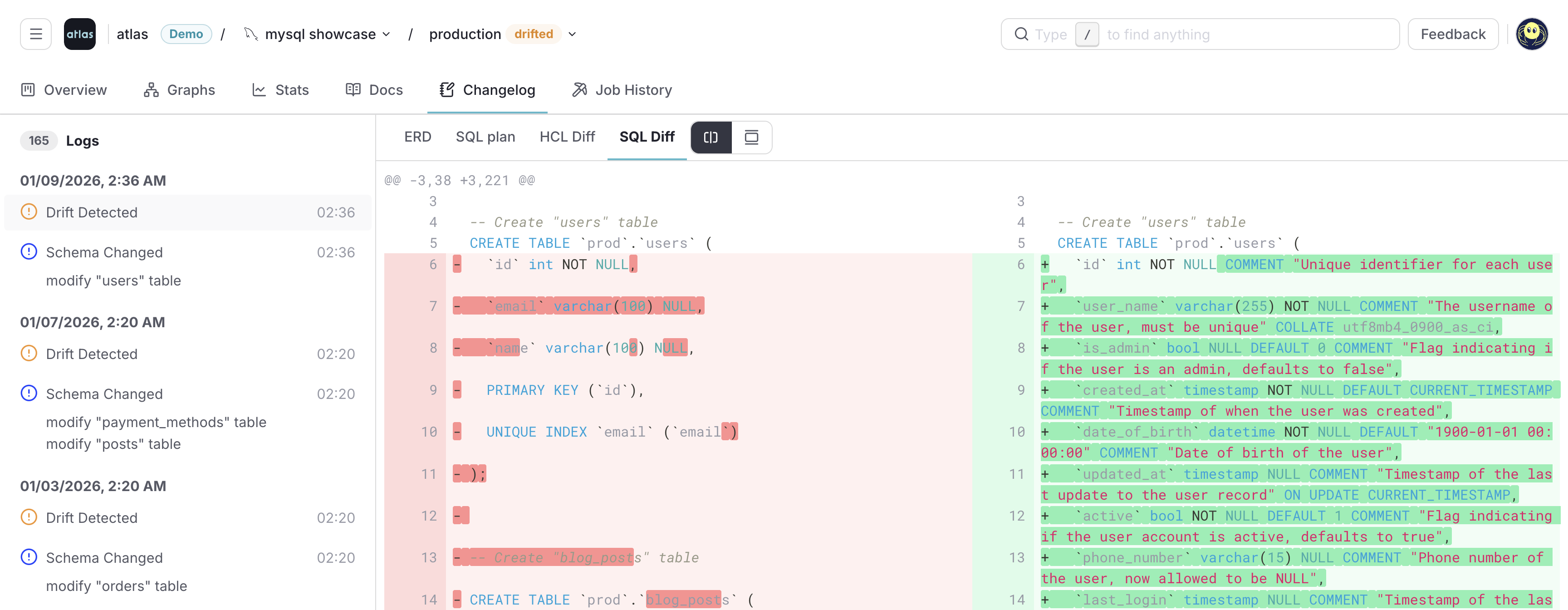
- Drift detection: Continuously inspect production databases using Atlas Agent or CI actions. If the actual schema drifts from the expected state, Cloud sends alerts with detailed HCL/SQL diffs.
- Notifications: Configure Slack and webhook alerts to be notified of drift, failed migrations, or other events.
- Column-Level Lineage
- ERD
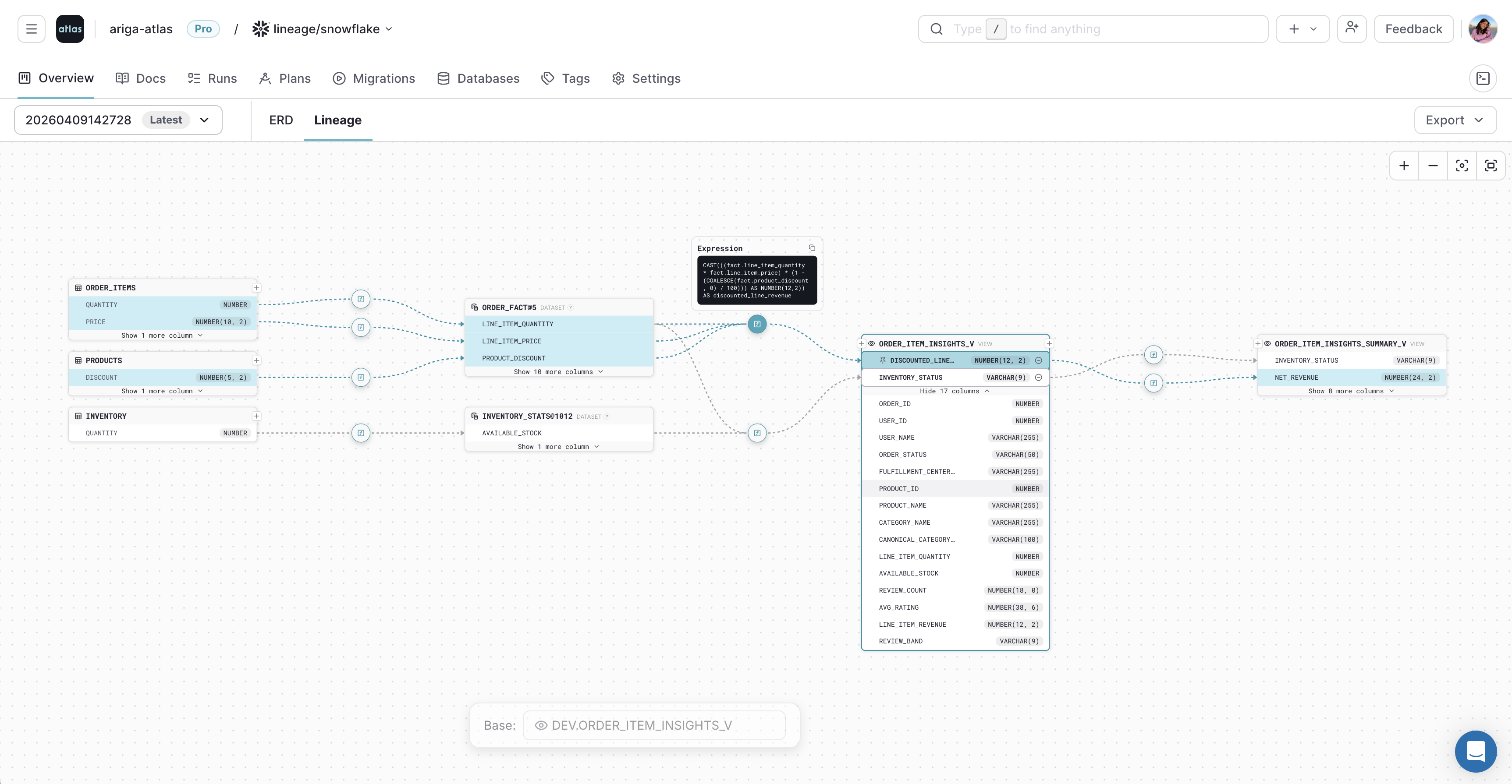
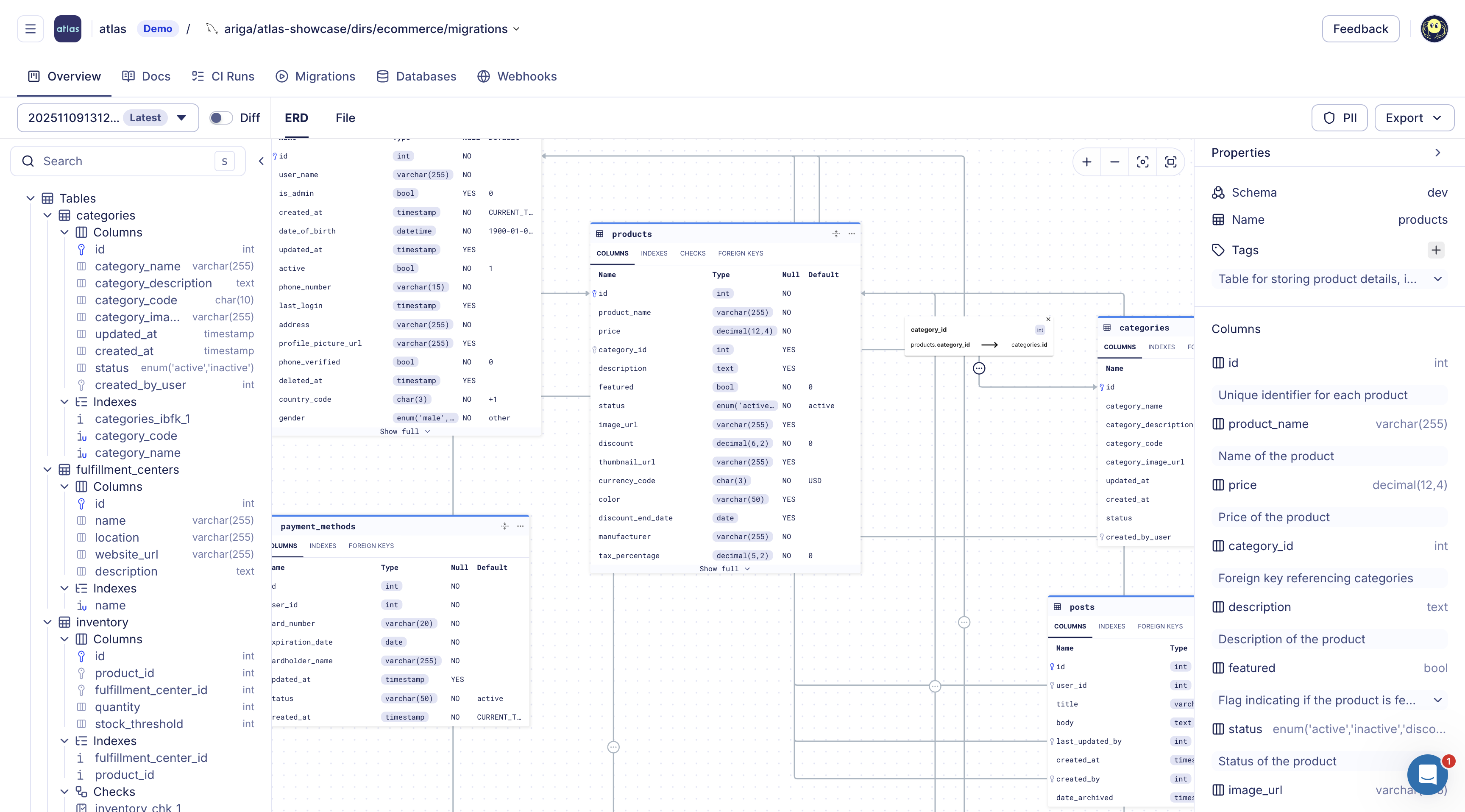
Read more at:
- Atlas Cloud: Column-Level Data Lineage
- Atlas Schema Monitoring: Drift Detection
- Atlas Schema Monitoring: Webhooks
Multi-Tenant Deployments
Many applications use a database-per-tenant or schema-per-tenant model when managing multiple customers. schemachange can loop over accounts or databases from your orchestrator, but the tool itself does not model tenant groups or coordinated rollout as a core primitive.
Atlas natively supports multi-tenant deployments. You can group your targets and batch plan changes, so one pipeline fans out consistently instead of needing to copy a shell script per tenant.
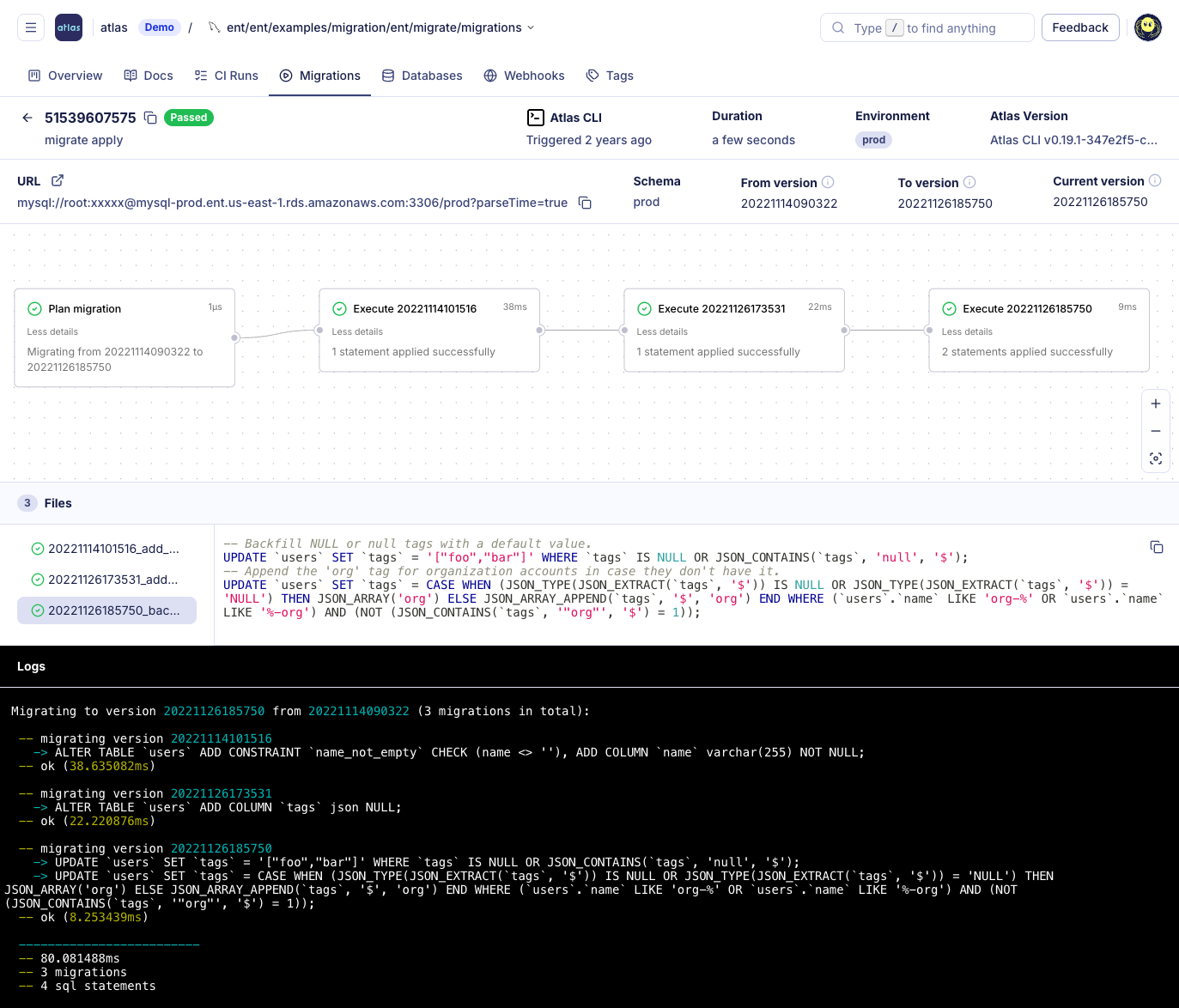
Further reading: Database-per-Tenant Introduction.
Atlas and AI Tools
With schemachange, an LLM might help draft migration SQL files, but there is no integrated assistant that routes suggestions through a single migration engine. You review and execute scripts through the same Python CLI as today.
Atlas keeps AI in the authoring lane. Agents can propose edits to schema sources, but Atlas diffs, lints, tests, and applies through the same secure paths as hand-written work.
Full overview: Using Atlas with AI Agents.
 GitHub Copilot Instructions
Steer Copilot toward Atlas schema files and CI-safe patterns.
 Cursor Instructions
Project rules that keep Cursor edits inside Atlas workflows.
 Claude Code Instructions
Claude Code guidance for schema repos using Atlas.
 OpenAI Codex Instructions
Codex setup when Atlas owns migration planning and apply.
Database Security as Code
In a schemachange repository, role grants and warehouse access live in the same ordered SQL files as structural DDL.
Similarly with Atlas, you can define roles and grants next to tables in HCL or SQL and let Atlas compare against your live Snowflake warehouse. With access control as part of your managed code, Atlas's linting and policy enforcement extend to these objects, so all the benefits of managing your schema as code are applied to your security objects, as well.
- HCL
- SQL
role "analyst_readonly" {
  login = false
}

role "etl_writer" {
  login     = true
  member_of = [role.analyst_readonly]
}

permission {
  to         = role.analyst_readonly
  for        = table.fact_orders
  privileges = [SELECT]
}

permission {
  to         = role.etl_writer
  for        = table.fact_orders
  privileges = [SELECT, INSERT]
}
CREATE ROLE IF NOT EXISTS ANALYST_READONLY;
CREATE ROLE IF NOT EXISTS ETL_WRITER;
GRANT ROLE ANALYST_READONLY TO ROLE ETL_WRITER;

GRANT SELECT ON TABLE fact_orders TO ROLE ANALYST_READONLY;
GRANT SELECT, INSERT ON TABLE fact_orders TO ROLE ETL_WRITER;
Declarative Data Management
With schemachange, you typically ship INSERT / MERGE statements as forward migrations and reason about
idempotency when a job replays or when environments diverge.
With Atlas, you can treat seed rows as part of the desired data state: declare rows in HCL or SQL, and let Atlas emit the minimal writes to converge.
- HCL
- SQL
table "dim_sales_region" {
  schema = schema.analytics
  column "code" {
    type = varchar(8)
  }
  column "label" {
    type = varchar(64)
  }
  primary_key {
    columns = [column.code]
  }
}

data {
  table = table.dim_sales_region
  rows = [
    { code = "EMEA", label = "Europe, Middle East, Africa" },
    { code = "AMER", label = "Americas" },
    { code = "APAC", label = "Asia Pacific" },
  ]
}
CREATE TABLE dim_sales_region (
    code VARCHAR(8) NOT NULL PRIMARY KEY,
    label VARCHAR(64) NOT NULL
);

INSERT INTO dim_sales_region (code, label) VALUES
    ('EMEA', 'Europe, Middle East, Africa'),
    ('AMER', 'Americas'),
    ('APAC', 'Asia Pacific');
Read more at:
Drift Detection
schemachange stores history in Snowflake, but it does not ship a built-in way to compare the live Snowflake schema to your repository on an ongoing basis. Teams that need evidence that production still matches Git usually add scheduled audits, custom jobs, or another monitoring product.
Atlas supports both CLI checks and continuous monitoring. Check for drift before applying new migrations, compare the live database to your declared schema from the command line or in CI, or use Schema Monitoring for automated comparisons, alerts, and an audit trail.
Pre-apply Drift Check
For Atlas versioned workflows, the pre-apply drift check runs at the start of
atlas migrate apply. Before any pending migration executes, Atlas compares the live database to the expected
schema at the latest applied migration (via the Atlas Registry). If they differ,
the apply aborts with a diff so you can fix the drift before new DDL runs. Configure it in atlas.hcl with a
check "migrate_apply" block.
check "migrate_apply" {
  drift {
    on_error = FAIL
  }
}
CLI Drift Checks
# Compare production Snowflake to the checked-in desired schema
atlas schema diff \
  --from "snowflake://$SNOWFLAKE_USER:$SNOWFLAKE_PASSWORD@$SNOWFLAKE_ACCOUNT/PROD_DB?warehouse=$SNOWFLAKE_WAREHOUSE" \
  --to "file://schema.sql" \
  --dev-url "snowflake://$SNOWFLAKE_USER:$SNOWFLAKE_PASSWORD@$SNOWFLAKE_ACCOUNT/DEV_DB?warehouse=$SNOWFLAKE_WAREHOUSE"
You can run this check on demand, on a schedule, or on pull requests using native integrations for GitHub Actions, GitLab CI, CircleCI, Bitbucket Pipelines, and Azure DevOps.
Automated Drift Detection with Schema Monitoring
Atlas Schema Monitoring continuously compares your database schema to the expected state with minimal performance impact. When drift is detected, you get alerts via Slack or webhooks, visual diffs (including ERD-oriented views), and context to plan remediation. See Drift Detection and the monitoring quickstart for setup.
Conclusion
schemachange is a solid tool for smaller Snowflake teams that are beginning to adopt schema management tools.
Atlas adds more to the migration process with automated planning, validation, observability, and flexibility. With Atlas, you can:
- Define the desired schema as code and let Atlas automatically plan the migration when making changes to it.
- Run automated linting and policy checks on every change to catch errors before they reach production.
- Test schema plans and migrations in CI before applying them to production.
- Receive alerts when Snowflake objects drift from the expected state.
- Use Atlas Cloud to host a registry of schemas and migrations.
- Integrate with GitOps tools like Kubernetes and Terraform.
- Batch rollout migrations across tenant databases where needed.
- Pair with AI tools like GitHub Copilot and Claude while maintaining secure paths for schema changes.
For the hands-on Atlas setup, see Automatic Snowflake schema migrations with Atlas.