Atlas v1.3: Security Graph for Databases, Atlas Scripts, the atlas cloud Command, and More

Hey everyone!
We're excited to announce Atlas v1.3. This release delivers on a promise we made in v1.2: the security graph is now live in Atlas Cloud, mapping your entire database attack surface. It also introduces Atlas Scripts for running data operations as code, safer and faster migrations, and a new command group for working with the Atlas Registry from the CLI.
Here is what you can find in this release:
- Security Graph for Databases - Map your entire database attack surface: permissions, misconfigurations, and CVEs across every object, with severity tiers and blast-radius tracing.
- Atlas Scripts: DataOps as Code - Backfills, GDPR purges, and reports declared as code: transactional mutations, masked queries, and batched loops, reviewed and tested in CI.
atlas cloud: Manage Registry Resources from the CLI - Repositories, databases, and deployment history from the terminal, with JSON output for scripts, CI gates, and AI agents, plus security graph and lineage graph exports.- Schema Annotations - Attach type-safe metadata to schema resources and render GraphQL, OpenAPI, or any other format from it with templates.
- Pre-Apply Drift Detection - Block a deployment when the database drifted from the expected state, with the diff printed before any statement runs.
- Database Driver Improvements - Lock-safe NOT NULL and 8x-10x faster schema tests on PostgreSQL, Oracle roles and storage, Snowflake Iceberg tables, ClickHouse row policies, and more.
- Simpler Licensing and No AI Training - One agreement replaces the separate EULA and SaaS terms, with a written commitment that we never train AI models on your data.
- macOS + Linux
- Homebrew
- Docker
- Windows
- CI
- Manual Installation
To download and install the latest release of the Atlas CLI, simply run the following in your terminal:
curl -sSf https://atlasgo.sh | sh
Get the latest release with Homebrew:
brew install ariga/tap/atlas
To pull the Atlas image and run it as a Docker container:
docker pull arigaio/atlas
docker run --rm arigaio/atlas --help
If the container needs access to the host network or a local directory, use the --net=host flag and mount the desired
directory:
docker run --rm --net=host \
  -v $(pwd)/migrations:/migrations \
  arigaio/atlas migrate apply \
  --url "mysql://root:pass@:3306/test"
Download the latest release and move the atlas binary to a file location on your system PATH.
GitHub Actions
Use the setup-atlas action to install Atlas in your GitHub Actions workflow:
- uses: ariga/setup-atlas@v0
  with:
    cloud-token: ${{ secrets.ATLAS_CLOUD_TOKEN }}
Other CI Platforms
For other CI/CD platforms, use the installation script. See the CI/CD integrations for more details.

Security Graph for Databases
Who can access what, and why? Answering that usually means cross-referencing GRANT statements
and role memberships scattered across dozens of migration files, and access does not stop at
tables: functions, triggers, views, and extensions carry privileges of their own. The security
graph replaces that manual audit by mapping your entire database attack surface:
- Trace full access paths across users, roles, and schema objects.
- Map every function, trigger, view, and extension along with their privileges.
- Identify extension CVEs, unmaintained code, and direct usage.
- Surface missing RLS,
PUBLICgrants, and excessive privileges.
Every object in your code or your database is plotted on one graph, with grant and inheritance
relationships as edges. Analyzers run on every push and color each object by its highest-severity finding, from CVEs
scored by CVSS to privilege-escalation paths such as SECURITY DEFINER functions. Selecting an
object highlights its blast radius: everything it affects or is affected by, traced transitively
through grants and inheritance.
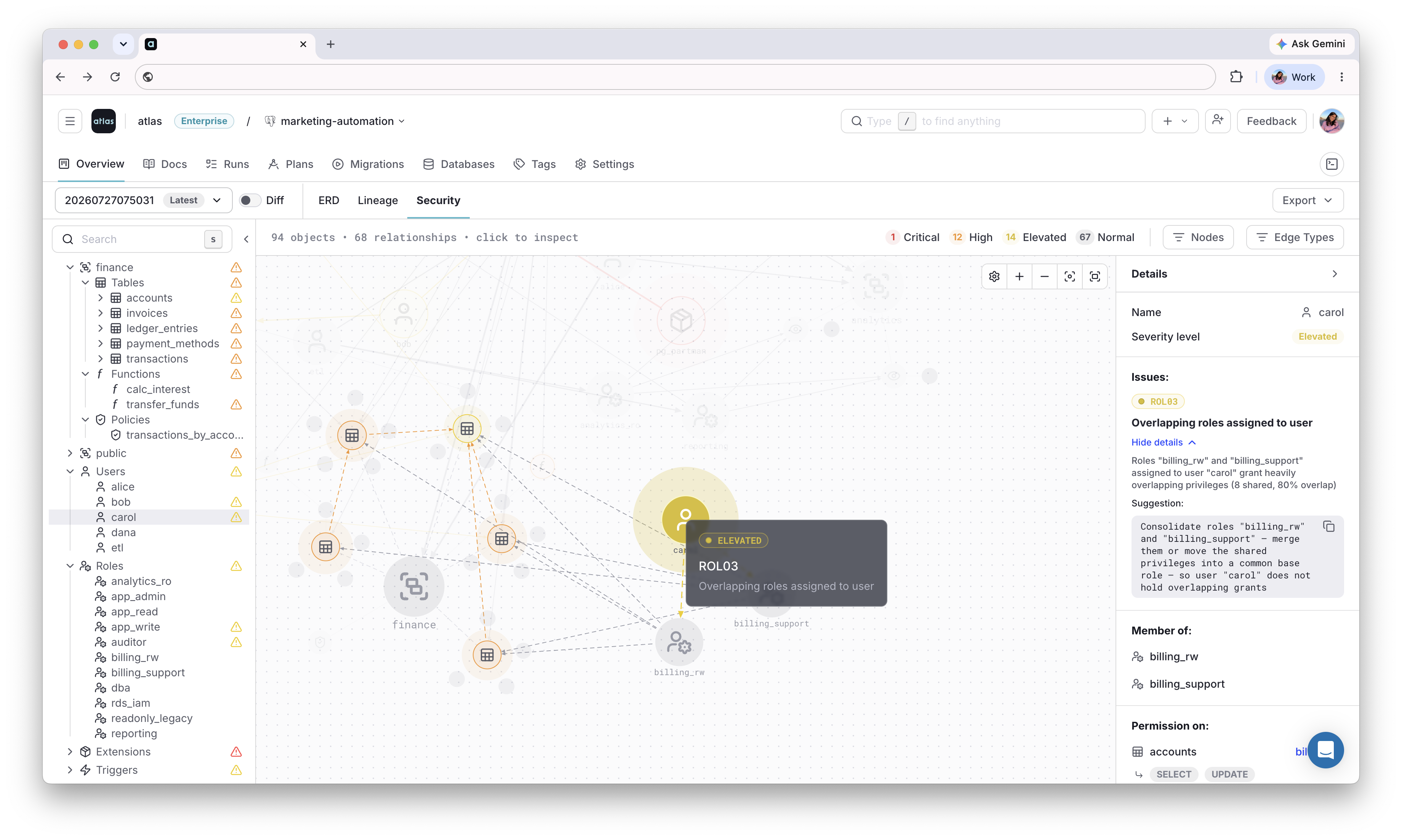
Selecting a role highlights everything it can reach
The graph works for schema repositories, migration directories, and monitored databases, so it reflects what a change is about to introduce, not just what is already live in production. It is also available from the CLI as a nodes and edges JSON graph, ready for a CI gate or an AI agent's context:
atlas cloud repo secgraph --slug my-repo | jq '.nodes[] | select(.reports[]?.level == "critical")'
To learn more, see the security graph documentation and the Security as Code guides.
Atlas Scripts: DataOps as Code
Schema migrations change the shape of your database. Atlas Scripts, introduced in this release, change or read the data. A migration is applied once per database, in order, and recorded in the migration history. A script runs whenever invoked and leaves no trace in that history. For this reason, it carries its own guards: condition gates, assertions, and batch bounds. Atlas Scripts are similar to Terraform Actions, but for your database: the Day 2 work that comes after the schema is in place.
Scripts come in three kinds, each with its own command: atlas script loop runs batched work with
pacing and back-pressure controls, atlas script query runs reads with output masking, and atlas script exec runs transactional mutations. Each run streams a per-step report of everything it did,
and --quiet prints only the script's output:
- Batched Deletion
- Masked Report
- Backfill
script "loop" "purge_inactive" {
  iterator "keyset" {
    cursor {
      id = int
    }
    init {
      sql = "SELECT id FROM users WHERE active = 0 ORDER BY id LIMIT 500"
    }
    next {
      sql  = "SELECT id FROM users WHERE active = 0 AND id > ? ORDER BY id LIMIT 500"
      args = [cursor.id]
    }
  }
  # Runs once per page, each iteration in its own transaction.
  do {
    exec {
      sql  = "DELETE FROM users WHERE id IN (SELECT value FROM json_each(?))"
      args = [jsonencode(iterator.keyset.batch[*].id)]
    }
  }
}
Example execution
atlas script loop --url "sqlite://purge.db" --file "file://purge.script.hcl" --run purge_inactive
Atlas streams a per-step report as the loop runs, grouping each iteration under its own header. Each
iteration opens its own transaction, the default PER_ITERATION mode, so a failure rolls back one
batch rather than the whole run. Reading the table back shows the inactive users gone and the active
ones untouched:
sqlite3 purge.db "SELECT count(*) FROM users WHERE active = 0; SELECT count(*) FROM users"
0
3
script "query" "customer_export" {
  query "rows" {
    sql    = "SELECT id, email, card FROM customers ORDER BY id"
    format = CSV
    mask {
      columns = ["email"]
      method  = HASH
      salt    = "prod-secret"
    }
    mask {
      columns    = ["card"]
      method     = PARTIAL
      keep_right = 4
    }
  }
}
Example execution
--quiet drops the per-step report and prints only the script's product, the masked CSV:
atlas script query --url "$URL" --file "file://export.script.hcl" --run '^customer_export$' --quiet
1,71f2179ddbb6c48f28aca29b80efe46b136ce9568dd75041a98ad482be6ca2fc,************1111
2,30afa44bf93ac9486cf6d5c225bd57bd2ac5a4c7175ae1b31fadc3859daeb300,************2222
The hash is salted and stable, so exports remain joinable across runs without carrying the email itself. The card keeps its last four digits.
script "exec" "archive_dormant" {
  # Stop cleanly if there is nothing to archive.
  condition "have_dormant" {
    sql = "SELECT count(*) > 0 FROM accounts WHERE last_seen < '2020-01-01'"
  }

  # Read the dormant rows once and bind them for the writes below.
  query "dormant" {
    sql = "SELECT id FROM accounts WHERE last_seen < '2020-01-01' ORDER BY id"
    rows { id = int }
  }

  # Copy to the archive, then delete, each keyed off the same captured ids, and
  # each asserting it touched exactly the rows the read found.
  exec "snapshot" {
    sql = <<-SQL
      INSERT INTO archive (id, email)
      SELECT id, email FROM accounts
      WHERE id IN (SELECT value FROM json_each(?))
    SQL
    args        = [jsonencode(query.dormant.rows[*].id)]
    expect_rows = length(query.dormant.rows)
  }
  exec "purge" {
    sql         = "DELETE FROM accounts WHERE id IN (SELECT value FROM json_each(?))"
    args        = [jsonencode(query.dormant.rows[*].id)]
    expect_rows = length(query.dormant.rows)
  }

  output {
    message = "archived ${length(query.dormant.rows)} dormant accounts"
  }
}
Example execution
atlas script exec --url "sqlite://archive.db" --file "file://archive.script.hcl" --run archive_dormant
Executing script "archive_dormant" (archive.script.hcl:1):

  -- tx open
  -- condition "have_dormant" ok (archive.script.hcl:3)
  -- exec "snapshot" (archive.script.hcl:15)
    -> INSERT INTO archive (id, email)
       SELECT id, email FROM accounts
       WHERE id IN (SELECT value FROM json_each(?))
  -- ok (400.584µs) | 3 rows affected

  -- exec "purge" (archive.script.hcl:24)
    -> DELETE FROM accounts WHERE id IN (SELECT value FROM json_each(?))
  -- ok (48.791µs) | 3 rows affected

  -- output (archive.script.hcl:30): archived 3 dormant accounts
  -- tx commit

  -------------------------
  -- 815.708µs
  -- 2 statements
Because scripts are code, they are versioned, reviewed, and tested in CI before touching
production data. The testing framework runs
them on a real dev database and verifies both the result a script produces and the privileges it
runs with, using the as block to execute under a reduced role.
Masking Sensitive Output
The result of a query may contain columns that must not appear in a report, an export, or an
agent's context: email, ssn, phone, or a *_enc column. A mask block
redacts those columns before the result leaves Atlas, with four methods. Each tab below masks one
column of the row (1, 'ada@example.com', '123-45-6789', '4111111111111111', '555-0100'):
- Redact
- Partial Mask
- Keyed Hash
- Regex Replace
- Mask Library
REDACT replaces the whole value with a fixed token (*** by default):
script "query" "u" {
  query "u" {
    sql    = "SELECT id, email, ssn FROM users WHERE id = 1"
    format = CSV
    mask {
      columns = ["email"]
      method  = REDACT
    }
  }
}
1,***,123-45-6789
PARTIAL keeps characters at the start and end and masks the rest:
script "query" "u" {
  query "u" {
    sql    = "SELECT id, card FROM users WHERE id = 1"
    format = CSV
    mask {
      columns    = ["card"]
      method     = PARTIAL
      keep_right = 4
    }
  }
}
1,************1111
HASH replaces the value with a keyed digest. The digest is deterministic, so equal inputs mask
to equal tokens and masked columns stay joinable across queries, runs, and files:
script "query" "u" {
  query "u" {
    sql    = "SELECT id, email FROM users WHERE id = 1"
    format = CSV
    mask {
      columns = ["email"]
      method  = HASH
      salt    = "prod-secret"
    }
  }
}
1,71f2179ddbb6c48f28aca29b80efe46b136ce9568dd75041a98ad482be6ca2fc
REPLACE applies a regular-expression substitution (match is the pattern, with the
replacement):
script "query" "u" {
  query "u" {
    sql    = "SELECT id, phone FROM users WHERE id = 1"
    format = CSV
    mask {
      columns = ["phone"]
      method  = REPLACE
      match   = "[0-9]"
      with    = "#"
    }
  }
}
1,###-####
Masks can also be named, defined once, and applied with use, so one mask library serves every
report:
# Reusable, named mask: hash identity columns with a fixed salt so tokens stay
# joinable across reports (define once, apply with `use`).
mask "identity" {
  columns = ["email", "ssn"]
  method  = HASH
  salt    = "prod-secret"
}

script "query" "customer_export" {
  query "rows" {
    sql    = "SELECT id, name, email, ssn, card, phone FROM customers ORDER BY id"
    format = CSV

    # Apply the reusable identity mask...
    mask { use = [mask.identity] }

    # ...plus per-column masks: keep the card's last 4, star the phone digits.
    mask {
      columns    = ["card"]
      method     = PARTIAL
      keep_right = 4
    }
    mask {
      columns = ["phone"]
      method  = REPLACE
      match   = "[0-9]"
      with    = "#"
    }
  }
}
Example execution
atlas script query --url "sqlite://export.db" --file "file://export.script.hcl" --run customer_export --quiet
1,Ada Lovelace,71f2179ddbb6c48f28aca29b80efe46b136ce9568dd75041a98ad482be6ca2fc,f63009387803b2964829857acedf2a92374d7fe00c942020180b129a4f3c646e,************1111,###-####
2,Bob Stone,30afa44bf93ac9486cf6d5c225bd57bd2ac5a4c7175ae1b31fadc3859daeb300,239d31c6bcb443ca87fa5a32702bdf112421223126cbe3c24a77ecb8889c0f4e,************2222,###-####
The reusable identity mask turns email and ssn into keyed HMAC-SHA256 tokens. Because the
salt is fixed, the same value hashes identically everywhere, so masked columns stay joinable. The
inline PARTIAL keeps the card's last four, and the inline REPLACE stars every phone digit while
leaving the dash. id and name match no mask, so they pass through. Masks apply in declaration
order, and the first match wins.
HTTP Operations
Deleting data is rarely one DELETE statement. A user's rows have copies beyond the database: a
document in the search index, an object in blob storage, a record in a downstream service, and the
deletion is complete only when every copy is gone. Meta built an entire framework,
DELF, around this problem: developers
reliably identify what must be deleted, and reliably miss where the copies live. Scripts express
the cascade as a loop: page through the deleted rows, call each service that holds a copy, and mark
progress only after it confirms:
script "loop" "purge_deleted" {
  iterator "keyset" {
    # ... pages through rows marked deleted, as in the batched deletion above.
  }

  do {
    # Drop the batch from the search index first.
    http "search" {
      url           = "https://search.internal/documents/delete"
      method        = POST
      body          = jsonencode({ ids = iterator.keyset.batch[*].id })
      expect_status = 200
    }
    # Mark the rows purged only after the call succeeds.
    exec {
      sql  = "UPDATE users SET purged = 1 WHERE id IN (SELECT value FROM json_each(?))"
      args = [jsonencode(iterator.keyset.batch[*].id)]
    }
  }
}
To learn more, see the Atlas Scripts documentation.
atlas cloud: Manage Registry Resources from the CLI
The Atlas Registry already knows which repositories exist, which version every database runs, whether it is in sync, and how each deployment ended. Until this release, all of it lived behind the Atlas Cloud UI, which is built for a person looking at a screen. Ask "is prod on the latest version?" from a CI job or a coding agent, and there was nothing to read.
The new atlas cloud command group answers from the terminal. It is the same Registry state the UI
renders, exposed as commands: atlas cloud repo lists, describes, and creates repositories,
atlas cloud database shows deployment targets, and atlas cloud migration inspects deployment
events.
- Databases
- Deployments
- Graph Exports
A database is a deployment target with a current version and a sync status: SYNCED, PENDING, or
FAILED. List them, optionally filtering by environment:
atlas cloud database list
ID   NAME                 ENV         STATUS   CURRENT VERSION
1    prod                 production  SYNCED   20260514083000
2    prod-eu              production  PENDING  20260512141500
3    staging              staging     FAILED   20260515093000
--------------------------------
Page: 1  Page Size: 3  Total: 18
That is a fleet check in one line: prod-eu is behind, and staging failed its last deployment. To
drill into one target and see when it was last deployed, use atlas cloud database describe --id 1.
Every migrate apply and schema apply reported to the Registry is recorded as a deployment event,
with a status of PASSED, FAILED, NO_ACTION, or DRY_RUN. Filter them by repository, status,
environment, or database name:
atlas cloud migration list --repo payments --status PASSED
ID   REPO       TYPE                 ENV         DATABASE    TARGETS  VERSION         STATUS
101  payments   MIGRATION_DIRECTORY  production  prod        -        20260514083000  PASSED
102  payments   MIGRATION_DIRECTORY  production  (multiple)  8/8      20260514083000  PASSED
--------------------------------
Page: 1  Page Size: 2  Total: 42
Notice the second row. Events that fan out to many databases, such as multi-tenant deployments, report
(multiple) and a succeeded/total ratio, so a single line tells you all 8 tenants got the
migration.
The group is also where the graphs leave the browser. atlas cloud repo secgraph prints the
security graph shown above, and atlas cloud repo lingraph
prints the lineage graph, either as a node and edge graph or as
OpenLineage events for catalogs like Marquez and DataHub:
atlas cloud repo lingraph --slug my-repo --open-lineage
The same graph the browser renders is now readable by catalogs and agents.
Every command prints a table for a person by default, and JSON for a script, a CI gate, or an agent that asks for it. List commands are paginated and filterable.
The lineage graph grew this cycle, as well:
- Redshift joins PostgreSQL, MySQL, ClickHouse, CockroachDB, and Snowflake as a supported engine.
- Nodes expose quick actions for expanding, collapsing, and toggling columns across related nodes.
- ClickHouse nodes display engine metadata such as table engine, projections, and ordering keys.
To learn more, see the documentation for deployments, the security graph, and the lineage graph.
Schema Annotations
External tools rarely consume database schemas directly: a GraphQL server wants SDL, a REST gateway wants OpenAPI, a data catalog wants its own ingest format. Maintaining each spec alongside the schema means two sources of truth that drift apart the moment a column is renamed. Schema annotations collapse that by attaching type-safe metadata to tables, columns, or any schema resource, and rendering whichever format the consuming tool expects:
- Annotate
- Template
- Export
Declare the annotation shape once on the schema's data source:
data "hcl_schema" "app" {
  path = "schema.hcl"
  annotation "table" {
    attr "type_name" {
      type = string
    }
    attr "description" {
      type = string
    }
  }
}
Resources then attach concrete values, and the same type-checker that validates the schema validates them on every load:
table "users" {
  schema = schema.public
  annotation {
    type_name   = "User"
    description = "A registered user"
  }
  column "id" {
    null = false
    type = int
    annotation {
      graphql_type = "ID!"
    }
  }
  // ...
}
A template block wires a Go template into the exporter, and on "table" runs it once per table:
exporter "template" "graphql" {
  template {
    src = "templates/type.graphql.tmpl"
    on "table" {
      name = "out/types/{{ .Name }}.graphql"
    }
  }
}

env "local" {
  url = data.hcl_schema.app.url
  export {
    schema {
      inspect = exporter.template.graphql
    }
  }
}
Inside the template, attr pulls annotations off any object and renders the target format, here
GraphQL SDL:
{{- with $ann := attr .Object "annotation" -}}
"""
{{ $ann.Attr "description" }}
"""
type {{ $ann.Attr "type_name" }} {
{{- range $c := $.Object.Columns }}
{{- with $cann := attr $c "annotation" }}
  {{ $c.Name }}: {{ $cann.Attr "graphql_type" }}
{{- with $cann.Attr "deprecated" }} @deprecated(reason: "{{ . }}"){{ end }}
{{- end }}
{{- end }}
}
{{- end }}
Run an inspect with --export and the specs are rendered from the schema:
atlas schema inspect --env local --dev-url "docker://postgres/15" --export
"""
A registered user
"""
type User {
  id: ID!
  name: String!
  nickname: String @deprecated(reason: "Use name instead")
}
Pre-Apply Drift Detection
Versioned migrations rely on deterministic execution: each migration file is written, reviewed, and tested against the exact state the migration history says the database is in. A manual hotfix breaks that silently, and the next deployment fails or makes things worse. Pre-apply drift detection verifies the guarantee inside the deployment itself.
Add a check "migrate_apply" block to the environment; before any statement runs, Atlas verifies
the database matches the expected state at the latest applied revision:
env "prod" {
  url = env("DATABASE_URL")
  migration {
    dir = "atlas://my-app"
  }
  check "migrate_apply" {
    drift {
      on_error = FAIL
    }
  }
}
- Drift detected
- No drift
When the target database differs from the expected state at the latest revision, the apply is aborted before any migration file runs:
Executing pre-execution check (1 check in total):

  -- check at atlas.hcl:10 (drift):
    -> check drift against version 20260423120000

        --- expected state
        +++ actual state
        @@ -0,0 +1,3 @@
        +CREATE TABLE "audit_log" (
        +  "id" integer NULL
        +);

    Error: database state does not match expected state at version "20260423120000"

-------------------------------------------

database state does not match expected state at version "20260423120000"
The diff is rendered in the apply transcript so the operator can see exactly which objects drifted. The migration files themselves are never executed.
When the database matches the expected state, the check passes and the migration proceeds:
Executing pre-execution check (1 check in total):

  -- check at atlas.hcl:10 (drift):
    -> check drift against version 20260423120000
    -- passed

  -- ok (12.4ms)

-------------------------------------------

Migrating to version 20260423130000 from 20260423120000 (1 migrations in total):

  -- migrating version 20260423130000
    -> ALTER TABLE users ADD COLUMN email text;
  -- ok (4.2ms)
Declarative migrations get the same gate with pre-execution checks.
Database Driver Improvements
Beyond the headline features, this release includes enhancements across the supported engines:
PostgreSQL
We improved two common pain points: NOT NULL migrations that lock or fail, and schema tests that
slow down as the schema grows:
- Lock-Safe NOT NULL
- Template Databases
Adding a NOT NULL constraint to an existing column carries two risks: the migration fails if the
column still holds NULLs, and SET NOT NULL takes an ACCESS EXCLUSIVE lock while it scans the
table. The new not_null diff policy removes both:
diff "postgres" {
  not_null {
    check     = true
    lock_safe = true
  }
}
check adds a pre-migration check that stops the deployment while the column holds NULLs, and
lock_safe plans the change so it never holds an ACCESS EXCLUSIVE lock for a table scan: the
constraint is added NOT VALID and validated under a lock that does not block reads or writes.
Pre-migration NOT NULL checks are also available on
MySQL and SQL Server. The not_null policy is part of Atlas Pro; run
atlas login to get started.
atlas schema test can now run every test group on a fresh copy of the dev database using
template databases. Copying a template is a server-side
bulk file copy with near-constant cost, so test runs become 8x-10x faster end to end, and dozens of
times faster on large schemas:
docker "postgres" "dev" {
  image    = "postgres:18"
  template = true
}
Template databases are part of Atlas Pro, like schema test itself; run atlas login to get
started.
Oracle
Oracle coverage deepened this cycle, from access control down to physical storage:
- Roles & Permissions
- Sequences & More
- Physical Attributes
- Domain Indexes
Roles and grants can now be defined as code next to the
tables they protect. Role hierarchies use member_of, and permission blocks grant privileges at
the table or column level:
role "APP_READONLY" {
}

role "APP_WRITER" {
  member_of = [role.APP_READONLY]
}

role "APP_PAYROLL" {
}

// Writer: full DML on EMPLOYEES
permission {
  to         = role.APP_WRITER
  for        = table.EMPLOYEES
  privileges = ["INSERT", "UPDATE", "DELETE"]
}

// Payroll: may update ONLY the SALARY column
permission {
  to         = role.APP_PAYROLL
  for        = table.EMPLOYEES.column.SALARY
  privileges = ["UPDATE"]
}
Atlas diffs the live database against this state and plans the exact GRANT and REVOKE
statements, including column-scoped grants like UPDATE ("SALARY").
Sequences, global temporary tables, database links, synonyms, and CHECK constraints get full lifecycle support. For example, a sequence backing a column default, plus a synonym for it:
sequence "my_seq" {
  schema    = schema.app
  start     = 1000
  increment = 1
  cache     = 20
  cycle     = false
}

table "orders" {
  schema = schema.app
  column "id" {
    null    = true
    type    = NUMBER
    default = sql("\"my_seq\".NEXTVAL")
  }
}

# Synonym pointing to a local sequence
synonym "seq_syn" {
  schema = schema.app
  object = sequence.my_seq
}
Atlas plans CREATE SEQUENCE and CREATE SYNONYM in dependency order and handles inspect, diff,
and migrate for all of them.
Atlas now inspects, diffs, and migrates the
physical attributes and storage clause of Oracle
tables. Add a physical block to a table, with a nested storage block for the segment:
physical {
  pctfree  = 5
  initrans = 2
  storage {
    initial     = 131072
    buffer_pool = KEEP
  }
}
Atlas emits the matching PCTFREE, INITRANS, and STORAGE clauses in CREATE TABLE, plans
ALTER TABLE for in-place changes (INITIAL and MINEXTENTS changes recreate the table), and
skips values that match Oracle or tablespace defaults.
Operators, index types, and domain indexes
are now first-class resources. Setting domain on an index builds it through an indextype, here
Oracle Text, with parameters passed to the indextype verbatim:
table "DOCUMENTS" {
  schema = schema.app
  column "ID" {
    null = false
    type = NUMBER(10)
  }
  column "TITLE" {
    null = false
    type = VARCHAR2(255)
  }
  primary_key { columns = [column.ID] }
  index "CTX_TITLE_IDX" {
    columns    = [column.TITLE]
    domain     = "\"CTXSYS\".\"CONTEXT\""
    parameters = "SYNC (ON COMMIT)"
  }
}
Snowflake
Snowflake coverage grew past tables to the objects around them, from account-level warehouses and volumes to tags and sequences:
- Iceberg Tables
- Warehouses & Monitors
- Tags
- Sequences
Iceberg tables and external volumes are now first-class objects. Declare the storage location once, reference it from the table, and Atlas creates the volume before the table and drops it after:
external_volume "my_s3_vol" {
  storage_location "S3" "s3_us_east" {
    storage_base_url     = "s3://my-bucket/iceberg/"
    storage_aws_role_arn = "arn:aws:iam::123456789012:role/snowflake-role"
  }
  allow_writes = true
}

iceberg_table "events" {
  schema          = schema.PUBLIC
  external_volume = external_volume.my_s3_vol
  catalog         = "SNOWFLAKE"
  base_location   = "events/"
  column "id" {
    type = NUMBER(10)
  }
}
Warehouses and resource monitors are now
first-class resources. Define a credit budget with its triggers, then attach it to a warehouse via
the resource_monitor attribute:
resource_monitor "analytics_rm" {
  credit_quota = 1000
  frequency    = MONTHLY
  notify_users = ["alice", "bob"]
  trigger {
    threshold = 80
    action    = NOTIFY
  }
  trigger {
    threshold = 100
    action    = SUSPEND
  }
}

warehouse "analytics_wh" {
  size             = XSMALL
  type             = STANDARD
  auto_suspend     = 300
  auto_resume      = true
  resource_monitor = resource_monitor.analytics_rm
  comment          = "Analytics workloads"
}
Atlas creates the monitor before the warehouse that points at it, and plans CREATE, ALTER, and
DROP statements from the diff.
Tags are now managed declaratively. Define a tag once, then assign it
to an object with a nested tag block that sets ref and value:
tag "USER_DOMAIN" {
  schema         = schema.SALES
  allowed_values = ["customer", "employee"]
  comment        = "data domain tag"
}

table "USERS" {
  schema = schema.SALES
  column "CUSTOMER_ID" {
    type = NUMBER(38)
  }
  column "NAME" {
    type = VARCHAR(16777216)
  }
  tag {
    ref   = tag.USER_DOMAIN
    value = "customer"
  }
}
Atlas plans the CREATE TAG statement and the assignment for schemas, tables, columns, views,
warehouses, and other objects.
Sequences are now first-class schema objects. Declare one in HCL,
use its NEXTVAL as a column default, and add depends_on so the sequence is created before the
table:
sequence "customer_id_seq" {
  schema    = schema.sales
  start     = 1
  increment = 1
  comment   = "Surrogate key for customer records"
}

table "customers" {
  schema = schema.sales
  column "id" {
    type    = NUMBER
    default = sql("customer_id_seq.NEXTVAL")
  }
  column "email" {
    type = VARCHAR(255)
  }
  depends_on = [sequence.customer_id_seq]
}
Atlas plans CREATE, ALTER, and DROP SEQUENCE from the diff; changes to start recreate the
sequence since Snowflake cannot alter it in place.
ClickHouse
ClickHouse gains governance controls, from row-level reads to query limits and credentials, plus user-defined functions compiled to WASM:
- Row Policies
- WASM UDFs
- Settings Profiles
- Named Collections
- Merged ALTERs
Row policies and full-text search indexes are
now first-class resources. A policy block filters which rows a role or user can read, and the
text index type tokenizes string columns for search. Three policies on one table, one scoped to a
role and a user, one restrictive and applied to everyone, and one that covers every role except
intern:
policy "analysts_only" {
  on    = table.orders
  using = "region = 'us'"
  to    = [role.analyst, user.report_user]
}
policy "exclude_deleted" {
  on          = table.orders
  restrictive = true
  using       = "is_deleted = 0"
  to_all      = true
}
policy "hide_pii" {
  on            = table.orders
  using         = "sensitivity < 3"
  to_all_except = [role.intern]
}
WASM modules and WASM user-defined functions are now first-class
resources. A wasm_module holds the compiled binary and its hash, and a function with
lang = WASM points at a module and names the export to call:
wasm_module "math_module" {
  code = sql("unhex('0061736d0100000001070160027f7f017f030201000707010373756200000a09010700200020016b0b')")
  hash = sql("reinterpretAsUInt256(unhex('a957fcb890da31e0e4a72bbdb0e04c50ba7ff5cb6946b21d674f9dcb6e7cd488'))")
}

function "wasm_numbers" {
  lang          = WASM
  returns       = UInt32
  module        = wasm_module.math_module
  source        = "sub"
  abi           = ROW_DIRECT
  deterministic = true
  arg "a" {
    type = UInt32
  }
  arg "b" {
    type = UInt32
  }
}
Atlas plans the module insert and the CREATE FUNCTION ... LANGUAGE WASM statement, and populates
the function's module SHA-256 hash when omitted. Enable it with wasm_modules = true on the
mode "clickhouse" block.
Settings profiles are now first-class resources. Named profiles define query constraints with optional bounds and writability, inherit from other profiles, and attach to roles or users:
role "analyst" {}

settings_profile "base_limits" {
  setting "max_memory_usage" {
    value = 10000000000
  }
  setting "max_threads" {
    value = 4
    min   = 1
    max   = 8
  }
}

settings_profile "analyst_limits" {
  inherit = [settings_profile.base_limits]
  to      = [role.analyst]
  setting "readonly" {
    value       = 1
    writability = CONST
  }
}
Management is opt-in: set settings_profiles = true in the mode "clickhouse" block of
atlas.hcl.
Named collections centralize credentials and integration settings so tables and table functions reference them by name:
named_collection "s3_data" {
  item "access_key_id" {
    value = getenv("AWS_ACCESS_KEY_ID")
  }
  item "secret_access_key" {
    value = getenv("AWS_SECRET_ACCESS_KEY")
  }
}
In the versioned workflow, atlas migrate diff generates statements for the collection and its keys
but omits the values, keeping secrets out of version control:
-- Create named collection "s3_data"
CREATE NAMED COLLECTION `s3_data` AS `access_key_id` = '', `secret_access_key` = '';
You populate the values separately, manually or from a secrets manager; the declarative workflow
with sensitive = ALLOW manages value rotation.
Atlas now merges compatible ALTER TABLE operations on the same table into a single statement, so the set of changes succeeds or fails together:
-- 4 separate statements (before)
ALTER TABLE `orders` ADD COLUMN `discount` Decimal(5, 2) DEFAULT 0.00;
ALTER TABLE `orders` MODIFY COLUMN `total` Decimal(12, 2) DEFAULT 0.00;
ALTER TABLE `orders` DROP INDEX `idx_status`;
ALTER TABLE `orders` ADD INDEX `idx_status` (`status`) TYPE set(100);

-- 1 merged statement (after)
ALTER TABLE `orders`
    ADD COLUMN `discount` Decimal(5, 2) DEFAULT 0.00,
    MODIFY COLUMN `total` Decimal(12, 2) DEFAULT 0.00,
    DROP INDEX `idx_status`,
    ADD INDEX `idx_status` (`status`) TYPE set(100);
MODIFY SETTING, RESET SETTING, and column recreations still get their own statements.
Redshift
Atlas inspects, diffs, and migrates
external schemas across all four source types: the AWS Glue
Data Catalog (Spectrum), Kafka, Kinesis, and federated PostgreSQL. Declare an external block inside
a schema block with the connection and IAM options for that source:
schema "es_catalog" {
  external "data_catalog" {
    database     = "spectrumdb"
    iam_role     = "arn:aws:iam::123456789012:role/spectrum"
    region       = "us-east-1"
    catalog_role = "arn:aws:iam::123456789012:role/catalog"
  }
}

schema "es_kafka" {
  external "kafka" {
    uri            = "b-1.kafka.example.internal:9092"
    authentication = NONE
  }
}
A schema's source cannot be changed in place, so switching an external block's source is planned
as a drop and re-create.
MySQL & MariaDB
MySQL gains partitioned tables in HCL, and both MySQL and MariaDB get invisible columns:
- Partitions
- Invisible Columns
Partitioned tables are declared in HCL for MySQL: RANGE, LIST, HASH,
and KEY, including the COLUMNS and LINEAR variants. Partitions live in a table-level partition
block, where expression-based types use by { expr = ... } and column-based types use
columns = [...]:
table "range_orders" {
  schema = schema.public
  column "id" {
    null = false
    type = int
  }
  partition {
    type = RANGE
    by {
      expr = "(`id` + 1)"
    }
    partition "p0" {
      values_less_than = ["101"]
      comment          = "first range"
    }
    partition "pmax" {
      values_less_than = ["MAXVALUE"]
      comment          = "catch all range"
    }
  }
}
Invisible columns are supported across inspect, diff, and
migrate on both MySQL and MariaDB. Mark a column with invisible = true:
table "users" {
  schema = schema.example
  column "id" {
    type = int
  }
  column "email" {
    type = varchar(255)
  }
  column "legacy_token" {
    type      = varchar(255)
    null      = true
    invisible = true
  }
  primary_key {
    columns = [column.id]
  }
}
Flipping a column's visibility is planned as a single column modification rather than a drop and recreate:
-- Modify "users" table
ALTER TABLE `users` MODIFY COLUMN `legacy_token` varchar(255) NULL INVISIBLE;
SQL Server
Table partitioning adds three constructs: partition_function,
partition_scheme, and a partition block inside table. This is what Atlas inspects back from an
Orders table partitioned on OrderDate across three boundary values:
partition_function "PF1" {
  input  = int
  values = ["100", "200", "300"]
}
partition_scheme "PS1" {
  partition  = partition_function.PF1
  filegroups = ["PRIMARY", "PRIMARY", "PRIMARY", "PRIMARY"]
}
table "Orders" {
  schema = schema.dbo
  column "OrderID"   { null = false, type = int }
  column "OrderDate" { null = false, type = int }
  primary_key { columns = [column.OrderID, column.OrderDate] }
  partition {
    scheme = partition_scheme.PS1
    column = column.OrderDate
  }
}
Changing only the boundary values is diffed into in-place SPLIT RANGE and MERGE RANGE operations
rather than a drop and recreate, and both are reversible with migrate down.
New Databases
Azure HorizonDB joins the driver list, YugabyteDB graduates from beta to GA, and Aurora DSQL gains
IAM token generation in atlas.hcl:
- Azure HorizonDB
- YugabyteDB
- Aurora DSQL
Azure HorizonDB, Microsoft's distributed PostgreSQL-compatible
database, is supported through the horizondb:// driver across schema inspect, declarative apply,
and versioned migrations. HorizonDB requires SSL, so include sslmode=require in the URL:
atlas schema apply \
  -u "horizondb://user:pass@host:5432/app?sslmode=require" \
  --to file://schema.hcl \
  --dev-url "docker://postgres/17/dev"
YugabyteDB is now GA: the ysql:// driver is supported across the CLI
and the Kubernetes Operator, including automatic dev-database provisioning:
atlas schema apply \
  -u "ysql://yugabyte@localhost:5433/yugabyte?search_path=public&sslmode=disable" \
  --to file://schema.hcl \
  --dev-url "docker://ysql/latest"
Aurora DSQL has no static database password, so the aws_dsql_token
data source signs a fresh IAM auth token on every command from the AWS credentials Atlas already
has:
locals {
  endpoint = "cluster-id.dsql.us-east-1.on.aws"
}

data "aws_dsql_token" "db" {
  endpoint = local.endpoint
  region   = "us-east-1"
  admin    = true
}

env "dsql" {
  url = "dsql://admin:${urlescape(data.aws_dsql_token.db)}@${local.endpoint}:5432/postgres?sslmode=require"
  dev = "docker://dsql/16/dev"
}
There is no long-lived secret to store or rotate.
Simpler Licensing and No AI Training
Atlas is now licensed under a single Master License and Services Agreement covering both the software (Atlas) and Atlas Cloud, replacing the separate EULA and SaaS agreements. New and free users are governed by the MSA; existing customers stay on their current agreements. It also puts our AI data-handling policy in writing: we do not train AI models on your data, and neither do our model providers, answering a concern that comes up in nearly every security review.
What's Next
This release also ships:
- Declarative schema backups, extending the Registry backups introduced in v1.2 to the declarative workflow.
- atlas config validate for static validation of
atlas.hclin CI and AI authoring loops. - Declarative renames with
renamed_from; and an IF NOT EXISTS diff policy.
We ship improvements continuously between releases, so follow the Atlas changelog to stay up to date.
Here is what we are working on next:
- Continued investment in database security, shifting detection further left into CI and pre-merge checks: more analyzers and broader engine coverage for the security graph.
- More control over Day 2 data operations, building on Atlas Scripts.
- Expanded database support, including NoSQL databases: MongoDB, Amazon DocumentDB, DynamoDB, and others.
Wrapping Up
Atlas v1.3 delivers what we promised in v1.2: the security graph for your databases, and backup storage that now covers the declarative workflow. It is also a first step into data operations: with Atlas Scripts, the Day 2 work that follows a schema change is versioned, reviewed, and tested like the migrations before it.
We'd love to hear your feedback! Join our Discord server or schedule a demo.